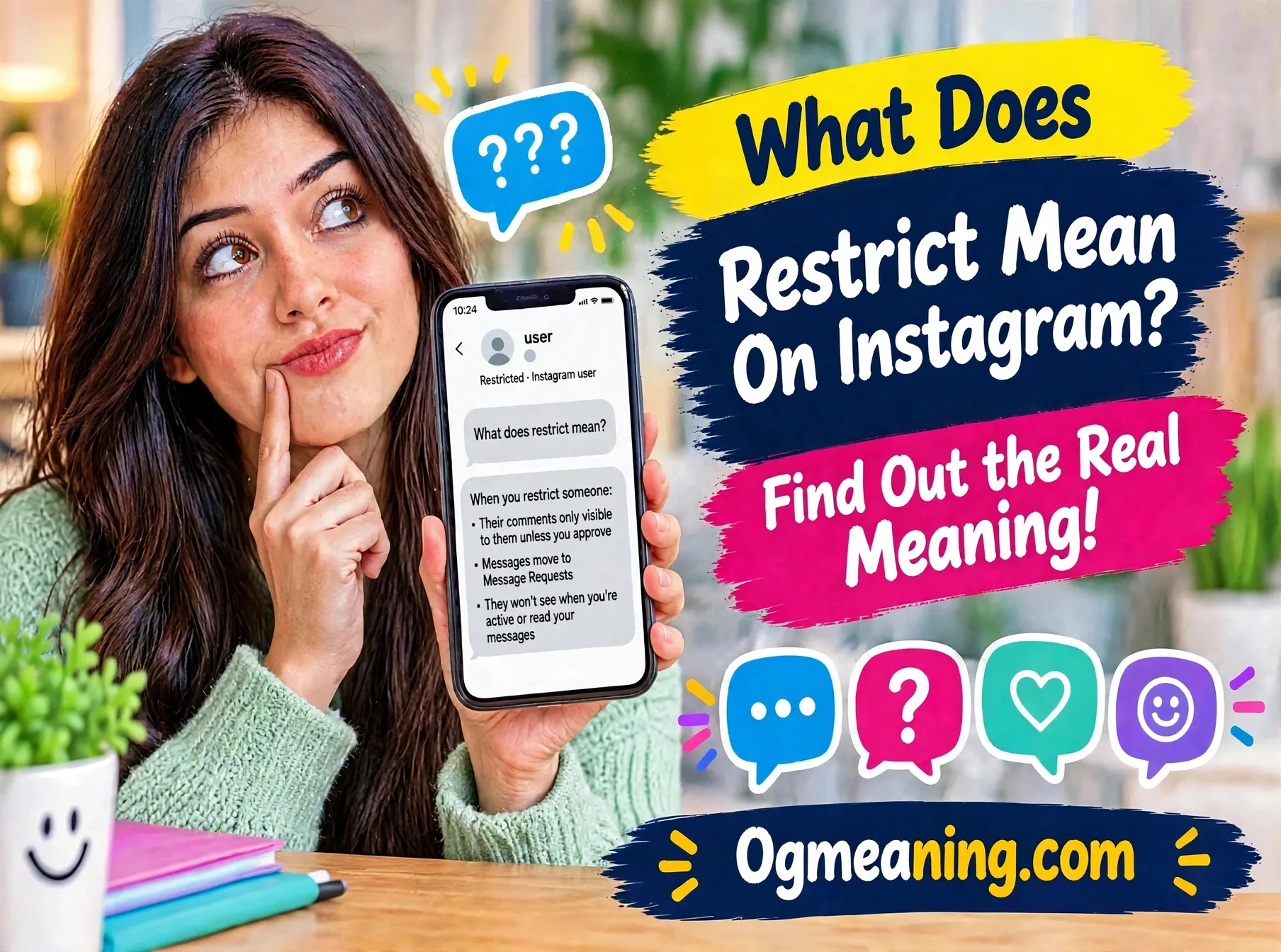
Someone keeps leaving rude comments under your posts. Or maybe a person you barely know fills your inbox every single day. You don’t want a fight. You just want some peace. 😌
So, what does restrict mean on Instagram, and why do so many people call it a “soft block”? It is a small button with a big job. It limits what another person can do around you, and it never tells them.
In this guide, you’ll learn what Restrict really does, how to turn it on, and when it’s the smartest move. By the end, you’ll know exactly which tool to pick the next time someone gets under your skin. 🔥
What Does Restrict Mean on Instagram? (The Quick Answer)
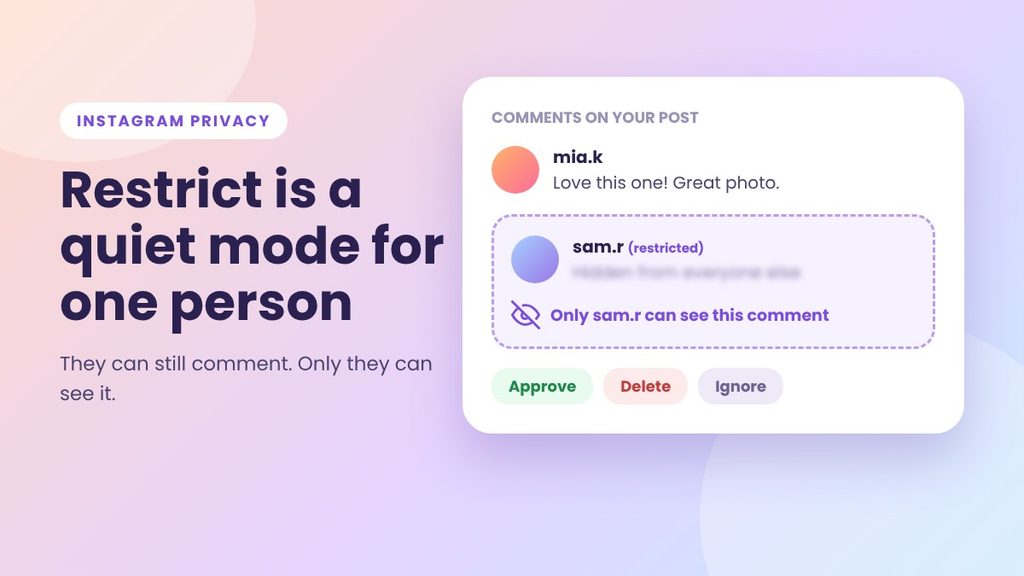
Restrict is an Instagram privacy tool that quietly limits what one account can do around you. Their comments on your posts become visible only to them, and their direct messages move to your Message Requests. They get no alert, and they can’t see when you’re active or when you’ve read their messages.
Instagram introduced this feature in 2019 as an anti-bullying tool. The thinking was simple. Bullying often comes from someone you know, and blocking that person can make things worse. Restrict gives you a calmer option. ✅
The person stays on your follower list. They can still look at your profile. However, their reach into your comment section and your inbox shrinks a lot.
What Does Restrict Mean on Instagram in Plain Words?
Here’s the easiest way to picture it. Imagine a loud guest at your party. You don’t throw them out, because that would cause a scene. Instead, you move them to a quiet corner. They can keep talking, but nobody else hears a word.
That is Restrict in one picture. The person can still comment and message. Yet the rest of the world no longer sees their comments, and you no longer feel the pressure of their messages.
Restrict has three big traits:
- 🤫 It’s silent. Instagram doesn’t notify the person.
- 🎯 It’s targeted. It affects only the account you choose.
- 🔄 It’s reversible. You can undo it in two taps.
Because of this, many people see Restrict as the middle path. It sits between doing nothing and cutting someone off completely.
Where Is Restrict Used?
If you’re still asking what does restrict mean on Instagram in practice, start with where it lives. Restrict is an Instagram feature, and you’ll find it mainly in the mobile app. It works in three places. Menus can look slightly different from one app version to the next, but the idea stays the same.
On Comments
You can restrict someone straight from a comment they left. This is handy when you spot a nasty remark and want to act right away.
In Direct Messages
You can restrict a person from inside your chat with them. After that, their new messages land in your Message Requests folder instead of your main inbox.
On Profiles
You can also restrict someone from their profile page. This works well when you already know who you want to limit before any new trouble starts.
A quick note on other apps: Facebook has a “Restricted” list too, but it works differently. People on that list can only see your public posts. So don’t mix the two up.
Real-life situations where people use Restrict include:
- A classmate or coworker who keeps teasing you
- A relative who comments on everything you post
- An ex who won’t stop messaging
- A stranger who argues in your comment section
- A follower who sends pushy messages to your business account
Why Do People Restrict Someone on Instagram?
The short reason is peace. However, there are a few deeper reasons behind it.
- To avoid drama. Blocking can feel like a loud statement. Restricting feels like a quiet step back.
- To stop harassment from spreading. Mean comments can’t be read by your followers anymore.
- To protect their mental space. Nobody needs a constant stream of negative pings.
- To keep a relationship stable. Sometimes you can’t cut off a boss, a cousin, or a neighbor.
- To control their own page. Your comment section is your space, and you decide who gets heard in it.
Creators and small business owners use Restrict too. A public page attracts all kinds of people, and not every comment deserves space. Restricting a troll protects your brand and your followers. It also saves you from a public argument that could scare off customers.
Also, there’s the privacy angle. When you restrict someone, you decide when to read their messages. Nothing tells them you opened the chat. That alone makes a big difference to people who feel pressured to reply fast.
What Happens When You Restrict Someone?
Let’s go through every change, one by one. This is the part most people get wrong, so read it slowly.
What Does Restrict Mean on Instagram for Comments?
When a restricted person comments on your post, they still see their comment under the post. Everyone else sees nothing. To them, it looks like a normal comment. That is the clever part.
You’ll see a note on that comment, and you get three choices:
- See comment: read what they wrote.
- Approve: make it visible to everyone.
- Delete or Ignore: remove it, or leave it hidden.
As a result, you stay in charge of your comment section. A kind comment from a restricted account can still go public. A harmful one stays hidden.
What Does Restrict Mean on Instagram for Your DMs?
Their direct messages go to Message Requests. You won’t get a notification for them. So your main inbox stays calm, and you can check the requests folder whenever you feel ready.
If you open one of those chats, the person doesn’t see a “seen” mark. That gives you time to think before you decide whether to answer. Keep in mind that replying or changing the chat’s status may change what you see on screen, so read each prompt before you tap.
What Does Restrict Mean on Instagram for Activity Status?
A restricted person can’t see when you’re online. They also can’t tell whether you’ve read their messages. Normally, those small signals cause a lot of stress. With Restrict, the pressure disappears.
What Does Restrict Mean on Instagram for Followers and Profiles?
Restrict doesn’t remove anything from your account. Specifically, these things don’t change:
- The person remains in your followers list, if they followed you before.
- They can still view your posts and stories, based on your privacy settings.
- They can still send messages and leave comments.
- They never get a “you’ve been restricted” alert.
How to Restrict Someone on Instagram (Step by Step)
The steps are short. Here are the four easiest ways.
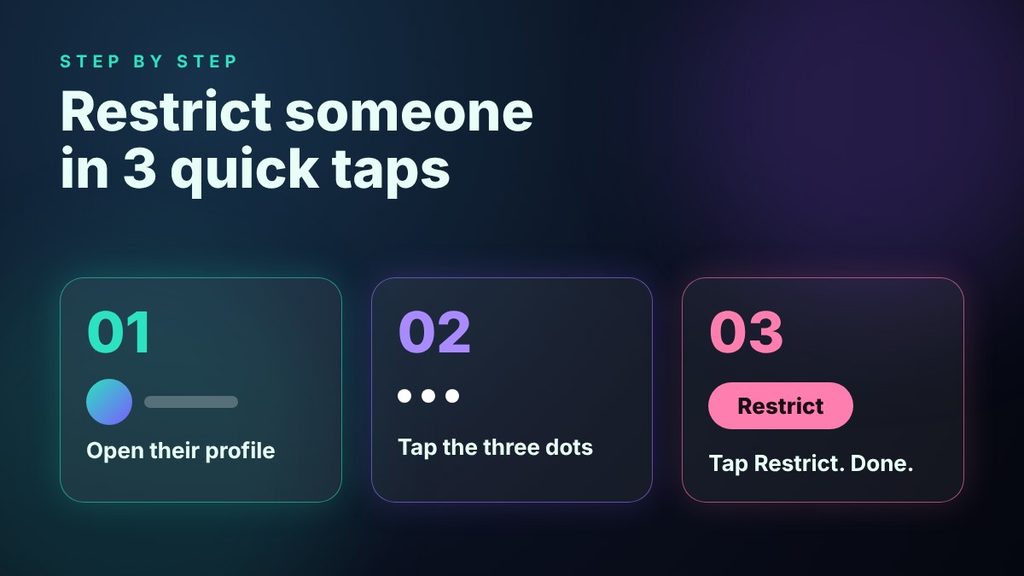
Method 1: From Their Profile
- Open the profile of the person you want to restrict.
- Tap the three dots in the top right corner.
- Tap Restrict, then confirm if the app asks.
Method 2: From a Comment
- Find their comment under your post.
- Swipe left on it (iPhone) or press and hold it (Android).
- Tap the small exclamation mark icon, then choose Restrict.
Method 3: From Your DMs
- Open your chat with the person.
- Tap their name or the info icon at the top.
- Choose Restrict.
Method 4: From Your Settings
Go to your privacy settings and look for Restricted accounts. From there, you can search for a name and add them. This is also the best place to review everyone you’ve restricted.
To undo it, repeat any of these steps and tap Unrestrict. The person won’t get a message about that either. 👍
Real-Life Examples: What Does Restrict Mean on Instagram in Practice?
Facts are useful, but stories make them stick. Here are four everyday examples. The names are made up, but the situations are very common.
Example 1: The Classmate Who Teases. Priya posts a photo from her school fest. A classmate writes a sarcastic comment that makes her feel small. She doesn’t want a fight, and she can’t avoid that person at school. So she restricts the account. The classmate’s comment now shows only to him. Priya feels calmer right away.
Example 2: The Overbearing Relative. Daniel’s uncle comments on every post with long, loud opinions. Daniel loves his uncle, but not his comments. Blocking him would cause a family argument. Restrict solves it. Daniel can approve the sweet comments and keep the rest hidden.
Example 3: The Pushy Message Sender. Amara runs a small bakery page. One follower sends ten messages a day asking for free cakes. She restricts him. His messages move to requests, and she answers them once a week. Her business inbox stays clean.
Example 4: The Ex Who Won’t Move On. Leo broke up with his partner months ago. Now the ex keeps messaging late at night. Leo restricts the account so the alerts stop. He still keeps the option to read the messages later, in case something important comes up.
What Does Restrict Mean on Instagram vs Block and Mute?
Restrict is easy to confuse with other tools. This table shows the differences at a glance. 👇
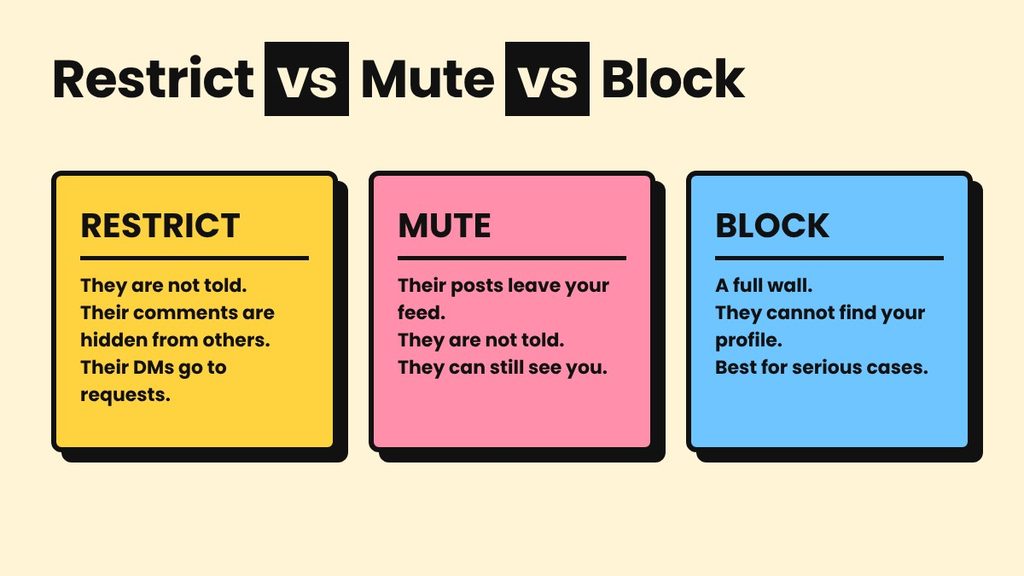
| Feature | Restrict | Mute | Block |
|---|---|---|---|
| Does the person get notified? | No | No | No |
| Their comments on your posts | Visible only to them, unless you approve | Show normally | Can’t be made |
| Their direct messages | Go to Message Requests | Arrive normally | Can’t be sent |
| Can they see your profile? | Yes | Yes | No |
| Their posts in your feed | Still show | Hidden | Gone |
| Best for | Rude or pushy people you can’t cut off | Boring or annoying posts | Serious or unsafe situations |
Other terms you’ll hear:
- Soft block: a nickname for Restrict, because it limits someone without a full wall.
- Remove follower: this takes someone off your followers list, which Restrict doesn’t do.
- Hide story from: this keeps selected people from viewing your stories.
- Hidden words: a filter that hides comments and requests with certain words or phrases.
Each tool solves a different problem. Restrict is about quiet control. Mute is about your feed. Block is about distance.
Not sure which one to pick? Use this simple guide:
- The posts just annoy you? Mute them.
- The person is rude or pushy, but you can’t cut them off? Restrict them.
- The person threatens or stalks you? Block and report right away.
When Should You Use Restrict?
Restrict works best when the problem is annoying, uncomfortable, or hurtful, but not dangerous. Choose it when:
- You want to avoid a confrontation.
- You can’t cut off the person socially, such as a coworker or family member.
- You want to read messages on your own schedule.
- You want to filter harsh comments without deleting every one by hand.
- You’re unsure and want a reversible first step.
On the other hand, Restrict isn’t enough when someone threatens you, stalks you, or keeps targeting you. In those cases, use Block, then use the Report option. Take screenshots first, because they can help later. ⚠️ If you ever feel unsafe, please talk to someone you trust or contact local authorities.
Common Myths: What Does Restrict Mean on Instagram, Really?
Because the feature works quietly, a lot of myths float around. If you’ve wondered what does restrict mean on Instagram beyond the basics, these facts will help.
- Myth: The person gets a notification. Fact: They don’t. Instagram keeps it private.
- Myth: Restrict removes them as a follower. Fact: It doesn’t. They stay on your list.
- Myth: They can’t see my posts anymore. Fact: They still can, unless your account is private and they don’t follow you.
- Myth: Their old comments disappear. Fact: Past activity doesn’t change. The new comment rules apply from then on.
- Myth: They can’t message me. Fact: They can. Their messages just go to a separate folder.
- Myth: Restrict is the same as block. Fact: Block builds a wall. Restrict only turns down the volume.
One more thing to know: a restricted person may still guess what happened. For example, they might notice that nobody replies to their comments. Restrict hides the signal, but it can’t control what someone imagines.
Can You Tell If Someone Restricted You?
Many readers ask this, so here’s the honest answer. Instagram doesn’t tell you, and there is no sure way to know. Still, a few clues can hint at it.
- Your comments on their posts get no replies or likes, even though they usually answer.
- Your messages stay unread for a long time, with no “seen” mark.
- Their activity status never shows, although they seem active elsewhere.
However, none of these signs prove anything. People get busy, switch off activity status, or simply ignore messages. So try not to read too much into small signals. If someone has limited contact with you, the kind response is to give them space. 💬
What to Do After You Restrict Someone
Tapping the button is only the first step. What you do next matters just as much.
First, take a breath. Restricting is a calm move, so there’s no need to explain yourself to anyone. Next, avoid replying to that person in public. A public reply can pull your followers into the argument, and that’s exactly what you wanted to avoid.
Then, talk to someone you trust, especially if the comments hurt. A friend, a family member, or a counselor can help you put things in perspective. Finally, set a reminder to review the situation in a few weeks. If the person has stopped, you can unrestrict them. If not, you know your next step: Block and Report.
Also remember that your feelings count. Feeling hurt by a comment doesn’t make you “too sensitive.” It makes you human. Using the tools Instagram gives you is a healthy choice, not an overreaction. 🌱
Pro Tips for Using Restrict Wisely
- Check hidden comments sometimes. Not every restricted comment is negative. Approve the kind ones.
- Pair it with Hidden Words. Together, these tools catch most unwanted content.
- Save proof first. If the behavior is abusive, take screenshots before you act.
- Review your list now and then. People change. If a situation has cooled down, unrestrict them.
- Use a private account for real privacy. Restrict limits interaction, but it doesn’t hide your content.
- Escalate when needed. If things get worse, move to Block and Report without guilt.
- Don’t overthink it. You owe nobody access to your comment section or your inbox.
For official, up-to-date instructions, you can also visit the Instagram Help Center, since app menus change from time to time.
Final Thoughts: What Does Restrict Mean on Instagram for You?
So, what does restrict mean on Instagram in the end? It’s your quiet shield. It hides unwanted comments, moves unwanted messages out of sight, and keeps your activity private, all without a word to the other person.
It won’t solve every problem. But for the everyday kind, like the rude commenter, the pushy follower, or the relative who overshares, it works beautifully. Use it early, review it often, and move to Block if you ever need a stronger wall.
Your online space should feel good to be in. Restrict helps you protect that, one small tap at a time. 💜
FAQ: Restrict on Instagram
What does restrict mean on Instagram for the person you restrict?
They aren’t told. Instagram doesn’t send any alert. However, they may notice small clues, such as comments that never get replies or messages that stay unanswered.
Can a restricted person still see my posts and stories?
Yes, in most cases. Restrict doesn’t hide your content. If you want to control who sees your posts, switch to a private account or use the “hide story from” option.
Is Restrict the same as Block?
No. Block cuts off contact and stops the person from finding your profile. Restrict only limits their comments and messages, and they can still see your profile. Pick Block for serious cases and Restrict for lighter ones.
How do I unrestrict someone?
Open their profile, tap the three dots, and choose Unrestrict. You can also remove them from the Restricted accounts list in your privacy settings. They won’t be notified.