
You open Snapchat and spot it right away. A tiny green dot sits next to a friend’s name. 👀
Suddenly, your mind starts racing. Are they online right now? Did they see your Snap and ignore it? Or is the dot just a glitch?
If you have ever asked yourself what does green dot on Snapchat mean, you are in the right place. First, you will get the clear answer. Then, you will learn how accurate the dot really is. You will also see where it shows up and how to hide yours in seconds. 🔥
By the end of this guide, you will read that little circle like an expert. Best of all, you will stop overthinking it.
What Does Green Dot on Snapchat Mean? (Quick Answer)
A green dot on Snapchat is the Activity Indicator. It shows that a friend has been active on Snapchat recently. The dot appears next to their name, avatar, or Bitmoji. It points to recent activity, not a guaranteed live presence.
In other words, the dot works like a small “they were around” signal. Snapchat turns it on by default, so most of your friends show it without doing anything.
However, the dot only works between friends. You normally see it when you and the other person have added each other. Also, the person needs to keep the Activity Indicator switched on.
Because of that, no dot does not always mean offline. It might mean the person was away for a while, hid their status, or does not follow you back. ✅
Green Dot on Snapchat Meaning in Plain Words
Still wondering what does green dot on Snapchat mean in simple terms? Think of it as a porch light. If the light is on, someone was probably home recently. If the light is off, you cannot say much either way.
Here is the simplest way to read it:
- ✅ Green dot visible: your friend opened or used Snapchat recently.
- ⚪ No green dot: they have been away for a while, or they hid their status.
- ⚠️ Green dot plus no reply: they are around, but they may be busy or not in the mood to chat.
So the dot answers one small question: “Has this person used Snapchat lately?” That is all it does. It does not reveal what they are doing or who they are talking to. It also cannot show whether they read your message.
Where Can You See What the Green Dot on Snapchat Means?
You can spot the dot in a few places inside the app. Snapchat updates its layout often, so the exact spot may shift a little on your phone. Still, the dot almost always sits near a friend’s picture.
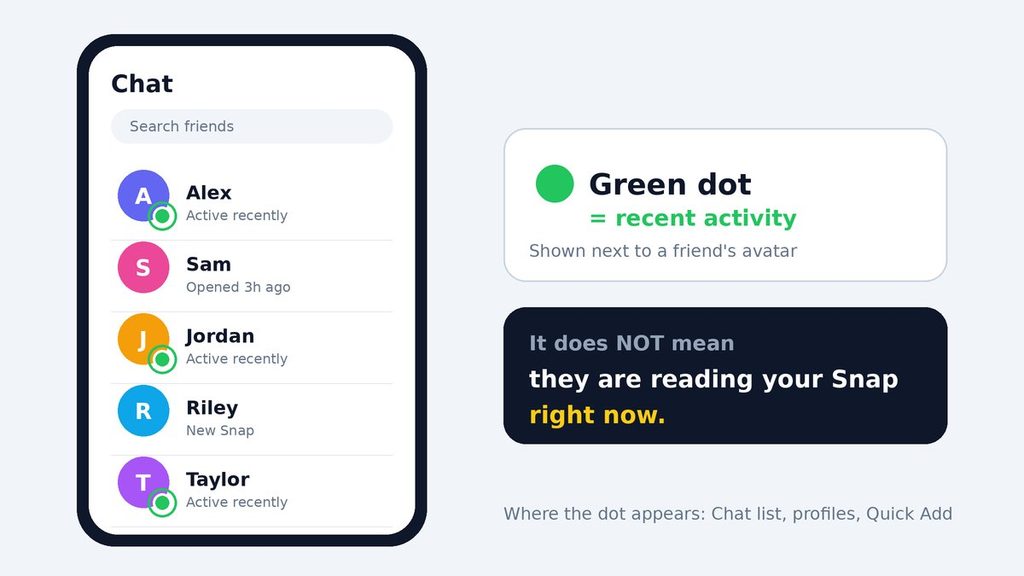
On the Chat screen: People often ask, “what does green dot on Snapchat mean here?” It means recent activity. The dot appears on the corner of a friend’s avatar or Bitmoji. This is the place most people notice it first.
On a friend’s profile: When you tap a friend’s Bitmoji, the dot can show up there as well. It tells you the same thing, which is recent activity.
What Does Green Dot on Snapchat Mean in Quick Add?
Quick Add suggests people you may know. Some of those suggestions also show a green dot. In that spot, it still means the person used Snapchat recently.
That detail helps you see which suggested accounts are active and which ones are probably abandoned.
Why Do People Use the Green Dot on Snapchat?
Most people never choose the dot. It simply appears, and many only ask “what does green dot on Snapchat mean?” once it confuses them. Still, friends rely on it for several practical reasons.
- 🔥 Better timing: You can send a Snap when a friend is likely to see it soon.
- 💬 Faster chats: A green dot nudges people to start a conversation while both of you are around.
- 🤝 Less guessing: You know whether a friend uses the app at all before you wait for a reply.
- 🔍 Account checks: You can tell which Quick Add suggestions look active.
Meanwhile, the indicator also creates pressure for some people. A friend who sees your dot may expect a quick answer. For that reason, Snapchat lets you turn the feature off, and you will learn how later in this guide.
How Long Does the Green Dot on Snapchat Stay?
This is the question people ask most, and the honest answer is simple: Snapchat does not publish an exact time. Different sources report different windows. Some say the dot fades within minutes. Others say it can last up to 24 hours after someone opens the app.
Because of that, the safest approach is to treat the dot as a sign of recent activity. It is not a live status like a phone call.
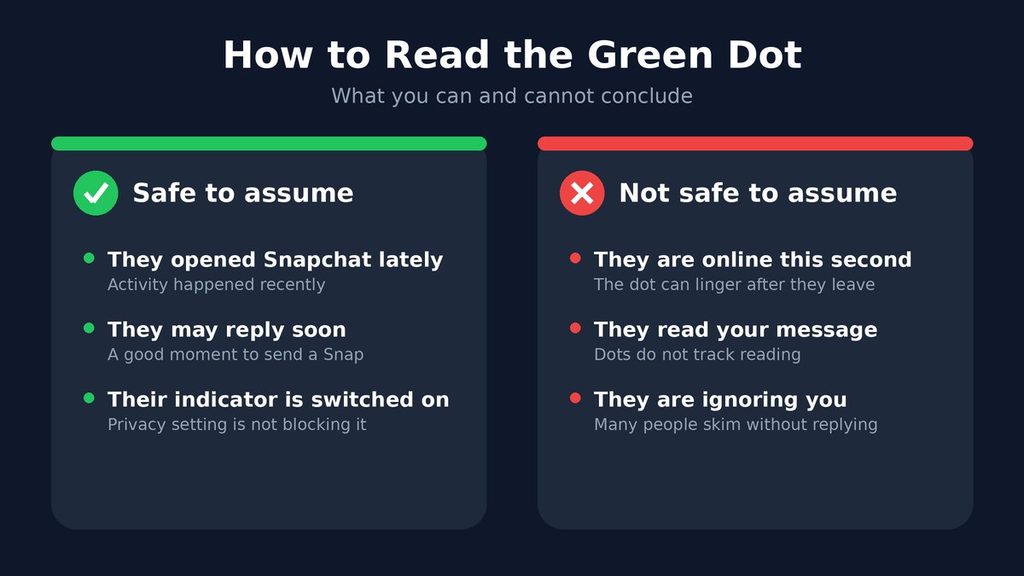
For example, a friend might open Snapchat at lunch and check a Story. Hours later, you still see a dot, even though they put their phone away long ago. So the dot can linger after someone leaves.
On the other hand, a missing dot may still hide a recent visit. A privacy setting could block it. Therefore, always combine the dot with other clues before you decide anything.
What the Green Dot on Snapchat Means in Real Life (Examples)
Examples make this much easier. Here are four common situations that answer “what does green dot on Snapchat mean?” in daily life. 📱
Example 1: The Quick Reply
You send a Snap to a friend and notice the green dot. Ten minutes later, they reply. In this case, the dot matched reality, and your friend was around.
Example 2: The Silent Dot
A friend shows a green dot, but your message stays unanswered all evening. Here, the dot only proves they opened Snapchat earlier. They may have checked one Story and left.
Example 3: The Missing Dot
You send a Snap and see no dot at all. Perhaps the friend turned off their Activity Indicator. Alternatively, they may simply be offline today. Either way, you cannot be sure.
Example 4: The Quick Add Check
You see an old classmate in Quick Add with a green dot. That suggests the account is active, so a friend request has a decent chance of getting a response.
What Does Green Dot on Snapchat Mean vs Similar Indicators?
Plenty of signals look alike, so people mix them up. This table shows how the green dot compares with other status clues. 📊
| Indicator | What it shows | How reliable is it? |
|---|---|---|
| Green dot on Snapchat | Recent activity from a friend | Good hint, but not exact |
| “Last active” on Snap Map | When a friend last opened the app, if they share location | More precise, but only for people who share |
| Opened or Delivered status | Whether your Snap or chat reached or got opened | Very reliable for that one message |
| “Online” status on other apps | A live presence signal on that platform | Varies by app |
| Green dot on your phone screen | Your phone is using the camera or microphone | Reliable, but it comes from your phone, not Snapchat |
As the table shows, the dot is a soft clue. If you need a firm answer, the Opened status on your own message tells you far more.
Other Colored Icons on Snapchat You Should Know
The green dot is not the only symbol in the app. Several colored icons appear in your chat list, and each one has its own job. Learning them saves you plenty of confusion. 🎨
- 🔴 Red icon: a Snap without sound.
- 🟣 Purple icon: a Snap with sound.
- 🔵 Blue icon: a text chat.
- ⬜ Outlined icon: a Snap or chat that someone already opened.
- ➡️ Filled icon: a Snap or chat that is still waiting.
Notice the difference. These icons describe messages, while the green dot describes a person’s recent activity. Because of that, an opened red icon is far better proof of reading than any dot. Icon styles can change with app updates, so treat this list as a general guide.
When Should You Trust the Green Dot on Snapchat?
The dot is useful, but only in the right moments. Use this quick guide to decide.
Trust it when:
- Casual chats: guess whether a friend will answer fast.
- Old contacts: check if an old friend still uses Snapchat.
- Timing: pick a good moment to send a Snap.
Do not rely on it when:
- Proof matters: you need to know that someone read your message.
- Feelings run high: you want to judge what someone thinks of you.
- Time is short: the matter is urgent, so call or text instead. 📞
In short, the dot helps with small decisions. It should never decide big ones.
How to Turn Off the Green Dot on Snapchat
If you prefer privacy, you can hide your own dot easily. The change takes only a few seconds. 🔒
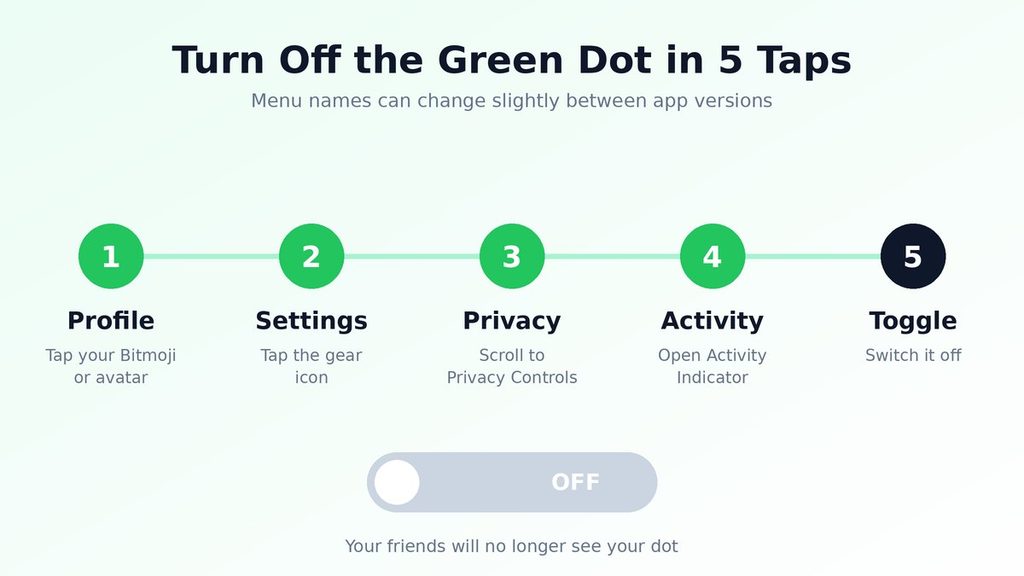
- Open Snapchat and tap your Bitmoji or avatar in the top corner.
- Tap the gear icon to open Settings.
- Scroll down to Privacy Controls.
- Tap Activity Indicator.
- Switch the toggle off.
After that, your friends will no longer see your dot. Menu names can change between app versions, so look for similar wording if you do not see these exact labels.
Keep in mind that the feature works both ways. When you hide your status, you may stop seeing other people’s dots too. That trade-off is fair, but it surprises many people.
Green Dot, Ghost Mode, and Your Privacy
People who ask “what does green dot on Snapchat mean for my privacy?” often mix up two separate tools. Understanding both helps you control what friends see. 🛡️
The Activity Indicator controls the green dot. It hides your recent activity from friends.
Ghost Mode belongs to Snap Map. It hides your location from friends. Turning it on does not switch off your green dot, and turning off the dot does not hide your location.
As a result, you need to check both settings if you want full privacy. For example, someone might hide the dot but still share a location on the map. That mix can surprise them later.
Also, think about who sees your information. Review your friend list now and then. Remove accounts you no longer know, because every connection can see your activity. Families who share devices should talk openly about these settings too, so everyone feels comfortable. 💬
Common Misunderstandings About the Green Dot on Snapchat Meaning
The dot is so small that people read far too much into it. They ask “what does green dot on Snapchat mean?” and then invent stories. Here are the biggest myths, so you can skip the drama.
Myth 1: “They are online right now.” Not always. The dot reflects recent activity, and it can stay visible after someone closes the app.
Myth 2: “They saw my message and ignored me.” No. The dot does not track reading. Only the Opened status can show that a Snap or chat was viewed.
Myth 3: “The dot shows their location.” Wrong again. The dot has nothing to do with where someone is. Location lives on Snap Map, and only friends who share it appear there.
Myth 4: “No dot means they blocked me.” Not necessarily. A missing dot has many harmless causes, such as hidden status or a few quiet hours.
Myth 5: “I can see the dot of anyone.” No. You usually need to be connected as friends, and the other person must keep the feature on.
The Green Dot at the Top of Your Phone Screen
Some people ask about a green dot at the very top of their phone while Snapchat is open. That dot is not a Snapchat feature. Your phone’s operating system shows it whenever an app uses the camera or microphone.
So if you see it while you record a Snap, nothing is wrong. It simply tells you the camera or mic is active. ⚠️ Still, if it appears when you are not using any app, check which apps have permission.
Green Dot Etiquette: How to Handle It Without Awkwardness
A tiny dot can create big social pressure. So what does green dot on Snapchat mean for your friendships? Very little, as long as you keep a few simple habits.
First, never treat a dot as a promise of a reply. People open Snapchat for Stories, Spotlight, and Maps, so a dot says very little about chat time.
Second, avoid sending five messages in a row because you saw a dot. Instead, send one clear Snap and wait. Patience shows respect.
Third, when you are the one with a dot, you may feel guilty for not answering. In that case, send a short note. Here are two easy examples:
- “Hey, I am busy today, but I will reply tonight! 😊”
- “Saw your Snap and loved it. Chat soon?”
Finally, if the dot causes stress for you or a friend, talk about it. A simple “No pressure to reply fast” often fixes the tension. Healthy friendships do not depend on a glowing circle.
Pro Tips for Using the Green Dot on Snapchat
Now that you know the basics, these tips help you get more value from the dot.
- 🎯 Combine clues. Pair the dot with Snap Map “last active” and the Opened status for a clearer picture.
- ⏰ Learn patterns. Notice when your close friends usually show dots. Then send important Snaps at those times.
- 📵 Protect your peace. If dots make you anxious, mute the habit of checking them. A quick break often helps.
- 🔒 Switch it off when you need space. Turning off the Activity Indicator stops friends from tracking your habits.
- 🗣️ Ask directly. If you wonder why someone is quiet, simply message them. A kind question beats an hour of guessing.
- 👀 Respect other people’s privacy. Seeing a dot does not mean someone owes you a reply.
Also, remember that dots change over time. Snapchat adjusts its features often, so check the app’s Help Center if something looks different on your screen.
Final Thoughts: What Does Green Dot on Snapchat Mean for You?
So, what does green dot on Snapchat mean for you? The green dot is a small signal with a simple job. It tells you that a friend used Snapchat recently. It does not prove they are online this second, and it never shows whether they read your message.
So use it as a friendly hint. Send your Snap, enjoy the chat, and let go of the guessing game. ✨
If you value privacy, switch the Activity Indicator off in a few taps. Either way, you now know exactly how that little circle works.
FAQ: What Does Green Dot on Snapchat Mean?
What does green dot on Snapchat mean on a friend’s profile?
It means that friend has been active on Snapchat recently. The dot reflects recent use, so it does not guarantee they are online at this exact moment.
Can everyone see my green dot?
No. Typically, only friends who are connected with you can see it. Moreover, you can hide it at any time through the Activity Indicator setting in Privacy Controls.
Why can’t I see someone’s green dot?
There are several possible reasons. They may have turned off their Activity Indicator, or they may have been inactive for a while. Likewise, you might not be connected as mutual friends. If you switched your own indicator off, you may also lose sight of other people’s dots.
Does a green dot mean someone is ignoring me?
Not at all. A green dot only shows recent activity. People often browse Stories or Spotlight without opening chats. Therefore, give them time before you assume anything.
Is the green dot the same as Ghost Mode?
No. The green dot shows recent activity, while Ghost Mode hides your location on Snap Map. They use separate settings, so adjust each one on its own.
How can I tell if someone is really online on Snapchat?
Combine several clues. Check Snap Map for “Last active” if the person shares their location. Also watch for a typing sign inside an open chat. Finally, look at the Opened status on your own message, because it gives the firmest proof.
Does turning off the green dot hide my Stories or Snap Score?
No. The Activity Indicator only controls the dot. Stories, location, and other features use their own privacy settings, so review each one separately.