
You open Snapchat, and a tiny green dot sits next to a friend’s Bitmoji. Suddenly, your mind starts racing. Are they online right now? Are they ignoring you? Did they just see your Snap? 🤔
Relax, because you are not the only one who wonders. In fact, what does a green dot on Snapchat mean is one of the most searched questions about the app. The answer is simple, but there is a twist. Snapchat shows two different green dots, and each one has its own meaning.
In this guide, you will learn what both dots mean and how accurate they are. You will also see real examples, a quick comparison table, and clear steps to hide your own status. Let’s get started. 🔥
What Does a Green Dot on Snapchat Mean?
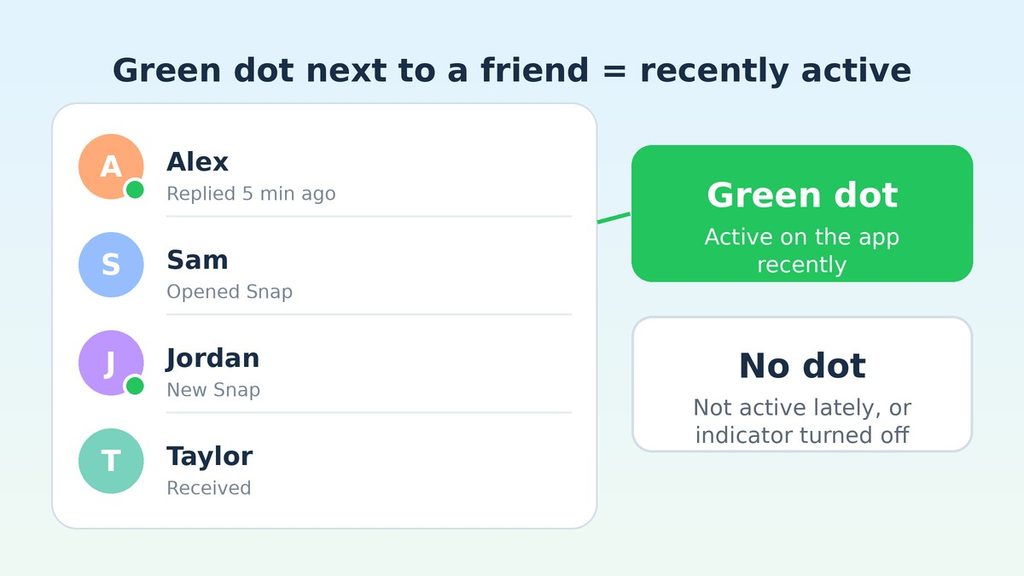
Quick answer: A green dot on Snapchat usually means a friend was recently active on the app. It appears next to their Bitmoji or name. A different green dot at the top of your phone screen means Snapchat is using your camera.
Snapchat calls the first dot an Activity Indicator. It works like the “online” light you may know from other social apps. Meanwhile, the second dot has nothing to do with your friends. Your phone’s operating system creates it to protect your privacy.
Because both dots are green, people mix them up all the time. As a result, many users panic over the wrong one. Therefore, it helps to learn the difference early.
The Two Kinds of Green Dots on Snapchat
- ✅ The friend dot: It sits on or beside a friend’s Bitmoji. It tells you they were recently active.
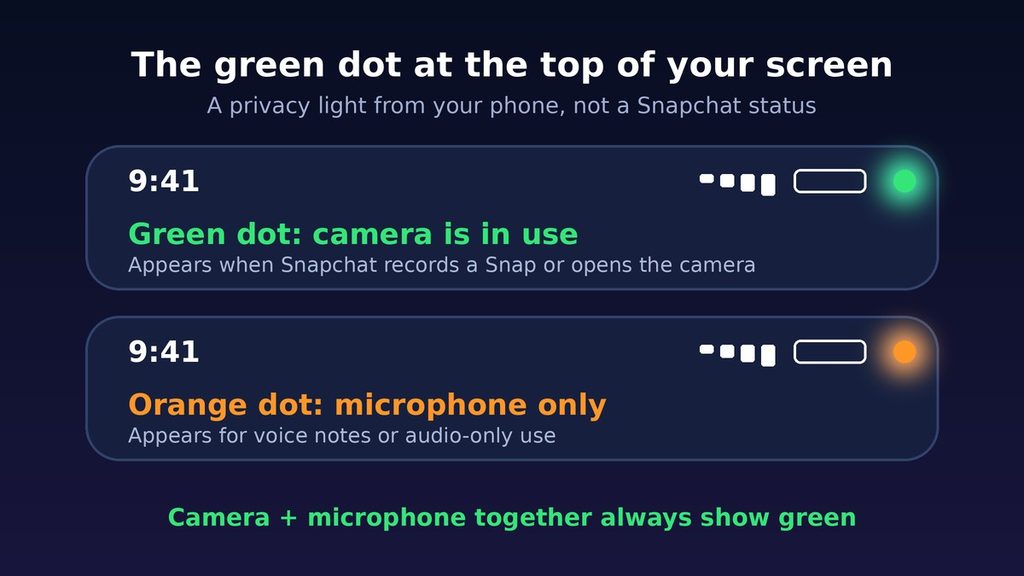
- ✅ The camera dot: It sits at the top of your own screen. It tells you an app is using your camera.
Keep these two apart, and the whole topic becomes easy. Next, let’s put the meaning into plain words.
The Simple Meaning of the Snapchat Green Dot
Think of the friend dot as a tiny “recently here” sign. If you see it, that person opened or used Snapchat not long ago. If you do not see it, they have been away for a while. Alternatively, they may have switched the feature off.
Notice the word recently. Snapchat does not publish an exact time window. In fact, different guides report different timeframes, from a few minutes to about a day. Consequently, you should treat the dot as a hint, not as proof.
In some cases, you may also see the word “Now” in green next to a name. That label points to a person who is using the app at that moment. It is a stronger signal than the dot alone.
The Simple Meaning of the Camera Dot
The camera dot is easier to understand. Whenever an app uses your camera, your phone shows a small green light near the top of the screen. Apple’s iPhone and Android phones both do this. Snapchat itself does not control it.
The dot usually fades a few seconds after you leave the camera screen. For example, you may see it on the camera page, and then it disappears when you open a chat.
Where Do You See a Green Dot on Snapchat?
The dots show up in a few places. Knowing each spot helps you read them correctly.
On the Chat Screen
This is the most common place. Open your Chat tab, and look at the friend list. A green dot near a friend’s Bitmoji means they were recently active. You may also notice it when you tap a friend’s profile from the chat page.
On the Quick Add Page
Quick Add suggests people you may know. Sometimes a green dot appears next to those names too. Again, it signals recent activity on the app.
At the Top of Your Phone Screen
The camera dot appears in the upper corner of your display. You will notice it when you open the Snapchat camera or record a video. Besides that, you might see an orange dot when you send a voice note. Orange means the microphone is active without the camera.
Why Do People Pay Attention to the Green Dot on Snapchat?
Snapchat moves fast. Messages disappear, and conversations live in the moment. Therefore, timing matters a lot, and the green dot gives you a small clue about it.
Here are the main reasons people care:
- 🔥 Better timing: You can send a message when a friend is likely to see it.
- 💬 Faster chats: Recent activity often means a quicker reply.
- 🤝 Less guessing: You know whether a friend has been around at all.
- 🔒 Privacy awareness: The camera dot warns you when an app uses your lens.
On the other hand, the feature has a downside. Some people feel pressure to reply the moment they appear active. For that reason, Snapchat lets you turn the Activity Indicator off. We will cover the steps in a moment.
Real-Life Examples of the Green Dot on Snapchat
Examples make everything clearer. Here are four common situations.
Example 1: Your Friend Shows a Green Dot
You send a Snap to a classmate at 8 p.m. Soon after, you notice a green dot next to their Bitmoji. That tells you they opened the app recently. However, it does not prove they read your Snap. They may have been watching Stories instead.
Example 2: No Green Dot at All
You check a coworker’s name and see no dot. Several things could explain it. They might be away from the app. Alternatively, they could have turned off their Activity Indicator. In addition, the dot only works between friends who have added each other.
Example 3: The Camera Dot Appears at the Top
You open Snapchat to take a photo. A green dot lights up in the corner of your screen. This is normal. It simply means the camera is on. Once you switch to the chat page, it should fade.
Example 4: The Dot Shows When You Are Not Using the Camera
You are scrolling through another app, and a green dot appears. First, stay calm. Another app may have asked for camera access, such as a video call tool. Then, check your phone’s privacy settings to see which app used the camera last. If something looks wrong, remove that app’s permission.
Green Dot on Snapchat vs Similar Signals
Snapchat has several small signals, and they can look alike. The table below shows how they differ.
| Signal | Where you see it | What it means |
|---|---|---|
| Green dot near Bitmoji | Chat list, Quick Add | A friend was recently active on Snapchat |
| “Now” in green | Next to a name | A friend is using the app at this moment |
| Green dot at screen top | Your phone’s status area | An app is using your camera (or camera and mic) |
| Orange dot at screen top | Your phone’s status area | An app is using only your microphone |
| No dot | Chat list | No recent activity, or the person turned the feature off |
As you can see, the friend dot tells you about someone else. The top-of-screen dots tell you about your own phone. That single idea clears up most of the confusion.
How the Snapchat Green Dot Compares With Other Apps
Many apps use a green dot, but they do not all work the same way. Therefore, a habit from one app can mislead you on another.
- 📸 Snapchat: The dot signals recent activity. It is not always live, and Snapchat gives no exact timeframe.
- 💬 Messenger and Instagram: A green dot usually marks people who are active at the moment or very recently. Each app has its own settings for this.
- 📱 WhatsApp: It skips the dot. Instead, it shows the word “online” inside a chat.
The lesson is simple. Always read a dot in the context of its own app. Moreover, check each app’s privacy settings, because most of them let you hide your status.
When Should You Use the Green Dot Information?
The dot is useful, but only in the right moments. Consider these situations.
- ✅ Time-sensitive messages: If you need a quick answer, a recent green dot may help you choose a good moment.
- ✅ Planning meetups: A friend who shows as active may reply faster about plans.
- ✅ Checking your privacy: The camera dot tells you when an app uses your lens.
In contrast, avoid using the dot to judge someone’s feelings. A missing dot or a slow reply rarely means anything personal. Besides, people open Snapchat for many reasons, and chatting is only one of them.
Common Misunderstandings About the Green Dot
Many myths surround this tiny circle. Let’s clear up the biggest ones. ⚠️
Myth 1: “Green Means They Are Online Right Now”
Not always. The dot points to recent activity. Some guides say it can linger for a while after someone leaves the app. Therefore, look for the green “Now” label if you want a stronger sign.
Myth 2: “Green Means They Saw My Snap”
This is false. The dot says nothing about your message. Snapchat uses separate icons, such as “Opened” or “Delivered,” for that purpose.
Myth 3: “Green Means They Are Ignoring Me”
Again, this is a guess, not a fact. A person can be active and still not look at their messages. For example, they may be browsing Spotlight videos or Stories. Moreover, they may simply be busy.
Myth 4: “The Top-of-Screen Dot Means Someone Is Spying”
Usually, it does not. The dot appears whenever any app uses the camera, including Snapchat itself. It is a safety feature, not a warning of danger. Still, if it shows up at odd times, review your app permissions.
Myth 5: “Everyone Can See My Dot”
Not exactly. Guides report that the dot works between friends who have added each other and kept the feature on. Strangers should not see it. Even so, you control the setting, so you can change it at any time.
Why You Might Not See a Green Dot on Snapchat
Sometimes a friend is clearly active, yet the dot never appears. Before you assume something is wrong, run through this short checklist.
The Friend Turned the Feature Off
Anyone can switch off their Activity Indicator. When they do, no dot shows next to their name, even while they use the app. Consequently, a missing dot proves nothing about whether they are around.
You Are Not Mutual Friends
The dot works between people who have added each other. If your friend has not added you back, you may not see it. Check the friend list to confirm the connection.
Your Own Setting Is Off
Here is a detail many people miss. If you turn off your own Activity Indicator, you may lose the ability to see others’ dots as well. Therefore, if the dots vanished after you changed a privacy option, switch it back on to test.
The App Needs an Update
An outdated version can show features in odd ways. Update Snapchat from your app store. Then restart the app and look again. In addition, a quick restart of your phone clears many small glitches.
How to Hide Your Green Dot on Snapchat
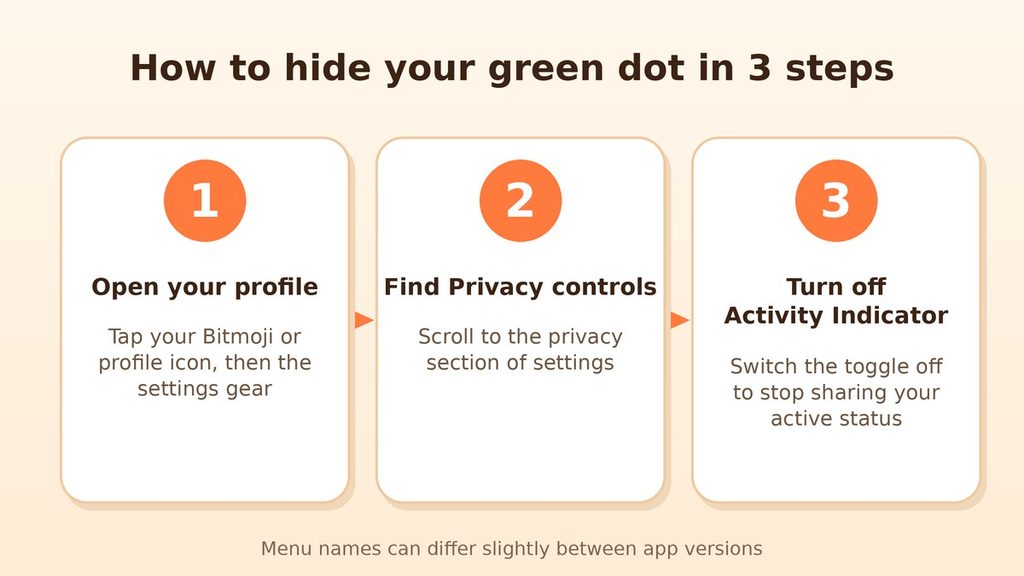
Do you want more privacy? You can turn off your Activity Indicator. Follow these steps:
- Open Snapchat and tap your Bitmoji or profile icon.
- Tap the settings gear in the corner.
- Scroll to the privacy controls section.
- Find Activity Indicator and switch it off.
Menu names can change between app versions, so your screen may look a little different. If you cannot find the option, update the app first. Then try again.
Can You Hide the Camera Dot?
The camera dot comes from your phone, not from Snapchat. Therefore, you cannot hide it inside the app. However, you can stop it by removing Snapchat’s camera and microphone permissions in your phone settings. Keep in mind that this stops the camera from working in the app entirely. As a result, you could not send photo Snaps until you allow access again.
What the Green Dot Reveals About You
It helps to flip the question around. Instead of asking what a friend’s dot says, ask what your dot says to others.
What Your Friends Can Learn
When your Activity Indicator is on, your friends can tell you were recently on the app. Over time, they may notice patterns. For instance, they might see that you are often active late at night. That is not harmful by itself. Still, some people prefer to keep their habits private.
What the Dot Cannot Tell Anyone
- ❌ What you are doing inside the app stays hidden.
- ❌ Whether you read a specific message is not revealed.
- ❌ Your exact location is not shared through this dot.
- ❌ Nobody learns who looked at your profile from it.
In other words, the dot is a light touch. It shares activity, not content. Nevertheless, you stay in charge. Review your settings whenever your comfort level changes. Likewise, if you ever feel pressured to reply because of your dot, turn it off without any guilt.
Pro Tips for Using the Snapchat Green Dot Wisely
- 💡 Treat the dot as a hint. It shows a likely pattern, not a promise.
- 💡 Look for “Now.” That label gives you a clearer sign of live activity.
- 💡 Do not rush replies. Seeing a friend’s dot does not mean you owe an instant answer, and the reverse is true for them.
- 💡 Check permissions often. Review which apps can use your camera and microphone every few months.
- 💡 Update the app. Snapchat changes its features from time to time, so the latest version shows the most accurate behavior.
- 💡 Talk to your family. Parents and guardians can explain these dots to younger users, so everyone understands what the app shares.
Final Thoughts
So, what does a green dot on Snapchat mean? In short, a dot beside a friend’s name means they were recently active. A dot at the top of your screen means your camera is in use. Both are small signals, and neither one tells the whole story.
Use the friend dot to time your messages, and use the camera dot to guard your privacy. Above all, remember that a tiny circle cannot reveal how someone feels. If you want more control, you can switch your own Activity Indicator off in a few taps. 🙌
FAQ: Green Dot on Snapchat
Does the green dot mean someone is online right now?
Not necessarily. It means the person was recently active. For a clearer sign, look for the green “Now” label, which shows when someone is using the app.
How long does the green dot stay on Snapchat?
Snapchat does not share an exact time. Reports vary from a few minutes after someone leaves the app to as long as a day. Because of this, treat the timing as approximate.
Why can’t I see a green dot next to my friend?
Several reasons are possible. Your friend may not have been active lately. They may have turned off their Activity Indicator. You may also not be mutual friends yet.
Why is there a green dot at the top of my screen?
That dot is a privacy light from your phone. It appears whenever an app uses your camera, or your camera and microphone together. An orange dot means only the microphone is active.