
You open a server and scan the member list. Then you spot a tiny yellow crescent next to a friend’s name. 🌙 Is it a mood, a warning, or a secret signal? If you have ever wondered what does the moon mean on Discord, you are not alone.
This small icon confuses many new members. It also trips up regular users who never stopped to check. The good news is that the answer is simple.
In this guide, you will learn what the moon means and why it appears. You will also learn how to control it. Along the way, you will see real examples, a clear comparison table, and practical tips. By the end, you will read every Discord status icon with confidence. 🚀
What Does the Moon Mean on Discord? The Quick Answer
The yellow crescent moon on Discord means the person has the Idle status. In other words, they still have Discord open, but they have not used it for a few minutes.
Think of it as Discord’s version of AFK, which stands for “away from keyboard.” Discord usually adds the moon on its own after a short stretch of inactivity. Most sources put that stretch at about five to ten minutes. Anyone can also choose the moon by hand from the status menu.
What Does the Moon Mean on Discord in Plain Words?
Here is the easiest way to remember it. A green dot says, “I am here.” A moon says, “I might be away.”
The moon does not mean the person is upset. It does not mean they blocked you. It does not even mean they are asleep, although the shape suggests night.
So when you see it, treat it as a soft hint. The person has Discord open somewhere, but they have not been active lately. They may reply in one minute, or they may reply in one hour. 🕒
What Does the Moon Mean on Discord Next to Other Status Icons?
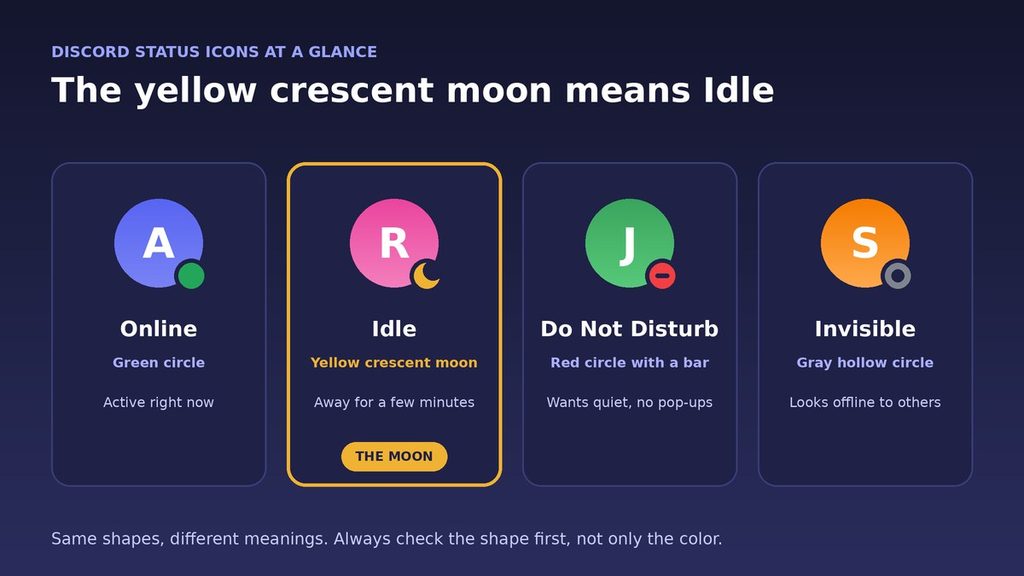
Discord places a small colored badge on the corner of every profile picture. Each badge tells you something different.
- 🟢 Online: a green circle. The person is active right now.
- 🌙 Idle: a yellow crescent moon. The person is away for a bit.
- ⛔ Do Not Disturb: a red circle with a bar. The person wants quiet.
- ⚪ Invisible: a gray hollow circle. The person looks offline, even when they are online.
- 🟣 Streaming: a purple icon. The person is live on a streaming service.
The moon is the only crescent in the set, so it is easy to spot. Because the shape differs, you do not need to rely on color alone. That also helps people who see colors differently.
Where Can You See the Moon on Discord, and What Does It Mean?
You can find the moon in a few places. Here are the most common ones.
In the Server Member List
Open any server and look at the member list on the right. Each name has a badge on the corner of its avatar. Idle members usually stay in the online section, so you can spot the moon at a glance.
In Direct Messages and the Friends List
The same badge appears next to your friends in the Friends tab. It also appears beside the avatar in your direct message list. As a result, you can check availability before you start typing.
On Your Phone
The mobile app shows the same yellow moon for Idle. Meanwhile, someone who is online on mobile may show a small phone icon instead of a plain green dot. So the badge can tell you a bit about where the person is.
How Can You Tell Idle From Offline?
Idle and offline look different, and the difference matters. An idle person still has Discord open. An offline person does not.
Idle members normally sit in the online part of the member list. Offline members drop to the bottom section. Also, Discord does not show a “last seen” time, so you cannot tell when an offline person left.
For that reason, the moon is actually good news. It tells you the person is probably nearby, and a message will reach them soon.
How Does Discord Decide When to Show the Moon?
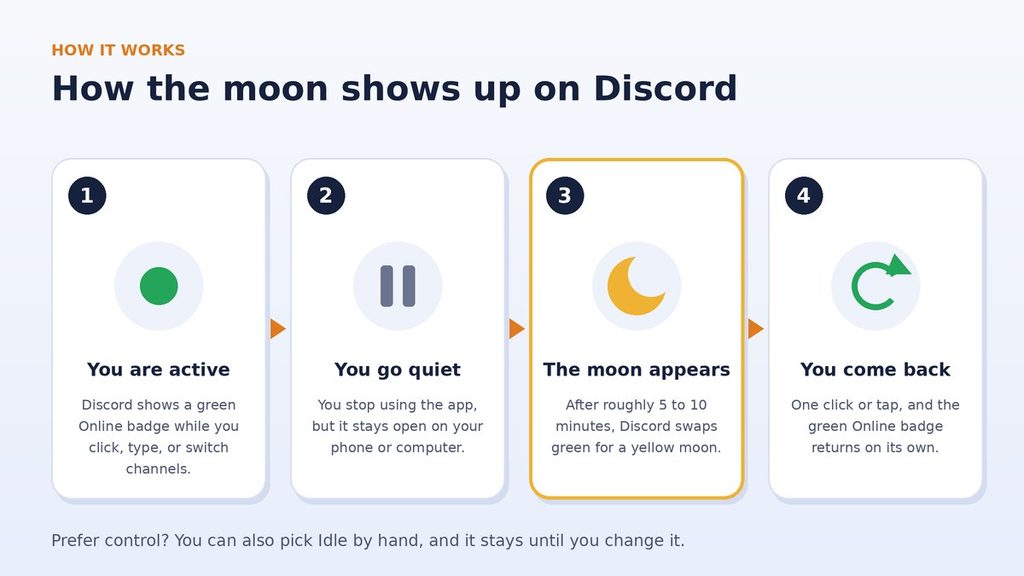
Discord uses two routes. One is automatic. The other is manual.
The Automatic Route. Say your status is Online, and you stop using the app. After a while, Discord switches you to Idle on its own. Sources differ on the exact timing, and Discord does not promise a fixed number. Most reports say five to ten minutes.
Once you click, type, or return to the window, Discord brings your green badge back. You do not have to do anything.
The Manual Route. You can also pick Idle yourself. In that case, the moon stays until you change it. This is useful when you want to look away, yet keep the app open.
Two Rules Worth Knowing. First, Do Not Disturb and Invisible never switch to Idle automatically. If you pick one of them, Discord keeps it.
Second, an idle person still receives notifications. That is a key difference from Do Not Disturb.
Why Do People Use the Moon Status on Discord?
Most people never plan to use it. Discord simply applies it. Still, many users choose it on purpose, and the reasons are easy to follow.
- Honesty: It tells friends you are away without a long message.
- Less pressure: Others expect a slower reply, so you can take your time.
- Quiet browsing: You can read a server while looking less available.
- Focus time: It signals a busy period, while notifications still reach you.
- Habit: Many people leave Discord open all day, so the moon simply follows their routine.
In short, the moon is a polite, low-effort way to share your availability. 🌙
Real-Life Examples: What Does the Moon Mean on Discord in Practice?
Each short story answers the same question: what does the moon mean on Discord when you actually see it in a chat?
Example 1: The Study Group. Sam asks a question in a study server. Then Sam notices a moon next to Riley’s name. Because of that, Sam does not expect an instant answer. Instead, Sam posts the question in the group channel, and a classmate replies within minutes.
Example 2: Game Night. Alex wants to start a match at 8 p.m. A friend shows a moon at that time. Alex sends a quick ping anyway, since idle users still get notifications. The friend returns, the green badge appears, and the match begins.
Example 3: Focus Time at Work. Jordan joins a team server for a project. During deep work, Jordan picks Idle by hand. Teammates see the moon and hold their non-urgent questions. Urgent messages still arrive, so nothing important gets lost.
Example 4: A Busy Help Channel. One moderator shows a moon during a quiet hour. A new member sees it and chooses the public help channel instead of a private message. As a result, many people can answer, and the question gets a faster solution.
What Does the Moon Mean on Discord in Different Servers?
The same icon can carry a slightly different feel from place to place. In fact, what does the moon mean on Discord can shift a little with the community. Here is a simple guide.
- Gaming servers: A moon often means a player went for a snack or a short break. A quick ping is usually fine.
- Study and work servers: A moon often signals focus time. Keep your message clear, and expect a reply later.
- Large public servers: The moon matters less here. Most people answer in channels, not in private messages.
- Small friend groups: The moon is casual. Friends know each other, so nobody reads too much into it.
Overall, context is everything. Look at the channel, the time of day, and the person’s habits before you decide what the moon means for that moment.
Moon on Discord vs Similar Status Icons
The table below shows how the moon differs from the other statuses. Use it as a quick cheat sheet.
| Status | What it looks like | What it tells you |
|---|---|---|
| Online | Green circle | The person is active now. |
| Idle (moon) | Yellow crescent moon | The person is away for a few minutes. |
| Do Not Disturb | Red circle with a bar | The person wants no desktop pop-ups. |
| Invisible | Gray hollow circle | The person appears offline. |
| Streaming | Purple icon | The person is live on a streaming service. |
Moon vs Do Not Disturb
The moon means away. Do Not Disturb means busy. With Do Not Disturb, Discord mutes desktop notifications. With the moon, alerts still reach the person.
Moon vs Invisible
The moon is open and honest. Invisible hides your real state. So someone with Invisible looks offline, while someone with the moon looks present but quiet.
How to Set the Moon Status on Discord Yourself
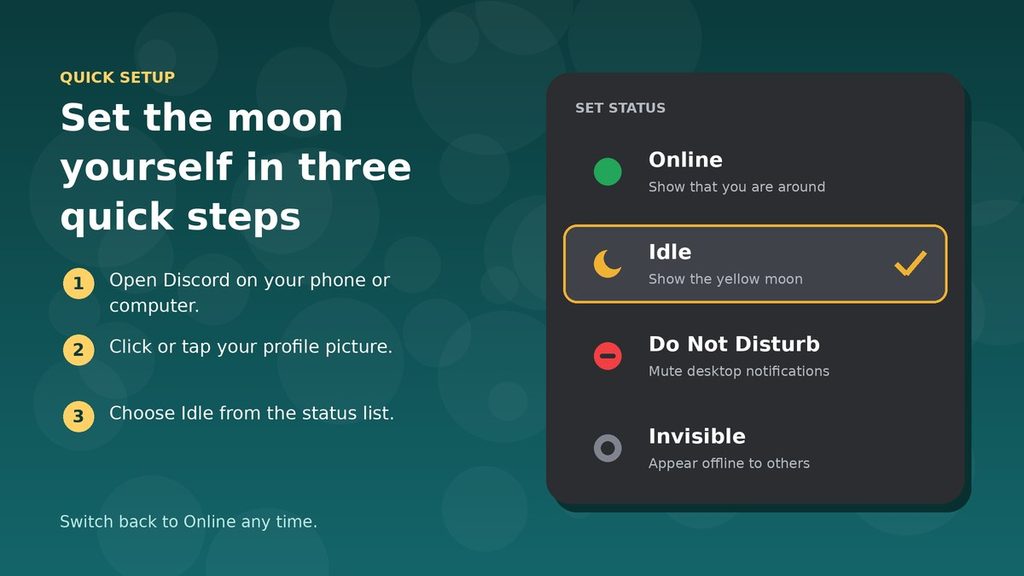
Setting the moon takes only a few seconds. Follow the steps for your device.
On Desktop or the Web
- Open Discord.
- Click your profile picture in the bottom-left corner.
- Choose Idle from the status list.
On iPhone or Android
- Open the app.
- Tap your profile picture in the bottom-right corner.
- Tap Set Status.
- Select Idle.
To remove the moon, open the same menu and pick Online. Your green badge returns right away.
Why Do You See the Moon When You Are Still Active?
Sometimes the moon appears even though you are using your device. This can feel odd, but it has simple causes.
- A manual setting: You may have chosen Idle earlier and forgotten about it.
- Time in other apps: Discord looks for activity inside Discord, so long stretches elsewhere can count as inactivity.
- A sleeping app: On a phone, the app may rest in the background and report you as away.
The fix is quick. Open Discord, tap your profile picture, and choose Online. If the moon keeps returning, check whether you set Idle by hand.
What Does the Moon Emoji Mean in Discord Chat?
Many people search for what does the moon mean on Discord when they really mean the emoji. 🌙 So do not mix up the status badge with the moon emoji. The emoji is a regular symbol that anyone can type in a message.
People use it for many reasons. Common ones include saying goodnight, joking about being a night owl, or adding a calm, dreamy mood. Context decides the meaning, so read the full message.
You can type it with the :crescent_moon: shortcode, or pick it from the emoji panel.
Some members also add the emoji to a custom status, such as “🌙 back tomorrow.” That is a note the person wrote. It is not the automatic Idle badge.
When Should You Use the Moon Status on Discord?
Pick the moon when you want to share a gentle “I am away” message. Here are good moments for it:
- You step away for a meal or a short errand.
- A video plays while Discord stays open in the background.
- Studying keeps you busy, yet you still want to catch quick questions.
- Lower reply expectations would help you relax.
However, the moon is not the best tool every time. Pick Do Not Disturb when you need real quiet. Invisible works better when you prefer privacy, and Online fits when you are ready to chat.
How Should You Reply When You See the Moon?
Seeing a moon does not mean you must wait. It just means you should message with care.
- Send one complete message. Include your question and any context, so the person can answer in a single reply.
- Skip repeated pings. One message is enough, since idle users still get notifications.
- Use a public channel when possible. Then many members can help, and you do not depend on one person.
- Wait a fair amount of time. Follow up only after a few hours if the matter is not urgent.
This approach respects the other person’s time. It also gets you better answers.
What Does the Moon Mean on Discord? Four Common Myths
People often guess when they ask, what does the moon mean on Discord? Here are the four biggest mix-ups.
Myth 1: The Moon Means Do Not Disturb. Not true. Do Not Disturb uses a red circle with a bar. The moon is yellow, and it only says the person is away. Idle people still get alerts.
Myth 2: The Moon Is a Message About You. No. The moon shows the person’s own activity. It says nothing about how they feel about you or your message.
Myth 3: The Moon Means Sleeping. Not always. Many people go idle during the day, for example at lunch. The person may be asleep, but the moon cannot confirm that.
Myth 4: The Moon Shows How Long Someone Is Away. It does not. Discord shows the badge, not a timer. You cannot tell if the person has been away for six minutes or six hours.
What Does the Moon Mean on Discord for Your Privacy?
The moon shares very little about you. It only shows that you have been quiet for a short time. It does not show where you are or what you are doing.
Even so, some people prefer to share less. If that sounds like you, Invisible hides your presence completely. Your messages still send as usual.
Discord also offers activity settings that control whether others see the game you play. Because these options can change with updates, open your settings and review them now and then.
Finally, remember that a custom status is public to people who can see your profile. Keep it short, and avoid private details.
Idle Moon vs the AFK Voice Channel
Server owners can also set an inactive channel for voice chat. This feature is separate from the moon.
The owner picks a timeout, such as one, five, fifteen, thirty, or sixty minutes. After that time, Discord can move silent, inactive members into the AFK channel. The moon never moves anyone. It only changes the badge.
So if Discord moves you, check your server’s voice settings. Your own status is not the cause.
Pro Tips for Using the Moon on Discord
- Check the shape, not only the color. Shapes stay clear even when colors look similar on small screens.
- Message anyway. Idle people get notifications, so a short message is fine.
- Do not pressure. A moon is not a deadline, so give people time to reply.
- Use Idle on purpose. Set it by hand when you step away for longer, so friends know what to expect.
- Add a custom status. A short note like “back at 6” gives more detail than the moon alone.
- Use Do Not Disturb for focus. It mutes desktop pop-ups, which the moon does not.
- Check the official source. Discord updates its apps often, so visit the Discord Help Center if an icon changes.
Final Thoughts: What Does the Moon Mean on Discord?
So, what does the moon mean on Discord? The yellow crescent moon means Idle, so the person is away for a bit but still logged in.
It does not mean Do Not Disturb. The moon also does not mean the person ignores you. Instead, it simply shares a quiet, friendly message about availability.
Now you know how it appears, how to set it, and how to avoid common mix-ups. Next time you see 🌙, you can reply with confidence. ✅
FAQ: What Does the Moon Mean on Discord?
Here are quick answers to the questions people ask most after searching: what does the moon mean on Discord?
Does the moon on Discord mean someone is asleep?
Not necessarily. The moon only shows inactivity. The person might be asleep, at lunch, or busy with another app.
How long until the moon on Discord shows up?
Reports vary, but most say about five to ten minutes of inactivity. Discord does not publish a fixed timer, so treat the number as an estimate.
Does the moon on Discord mean I cannot message someone?
No. Idle users still get notifications, so your message reaches them. Just expect a slower reply.
Does the yellow moon on Discord mean Do Not Disturb?
No. The moon means Idle, and it is yellow. Do Not Disturb is a red circle with a bar, and it mutes desktop notifications.
How do I remove the moon on Discord?
Open the status menu and pick Online. If you leave the app untouched, Discord may switch you back to Idle later. To stop that, you would need Do Not Disturb or Invisible, which change what others see.