
You open your chats and see a green dot on Snapchat sitting on your friend’s Bitmoji. Your mind starts racing. 😬
Are they online right now? Or are they ignoring you? Did they just read your message?
If you have ever asked yourself, what does the green dot on Snapchat mean, you are not alone. Millions of people wonder about it every day. Sadly, many of them guess wrong.
Here is the short version. The green dot is an activity indicator. It shows that a friend was active on the app recently. So it does not mean they are staring at your chat. ✅
In this guide, you will learn what the dot really means and where you can spot it. You will also see real examples, a comparison table, and simple steps to hide your own dot. Let’s clear up the confusion. 🔥
What Does the Green Dot on Snapchat Mean?
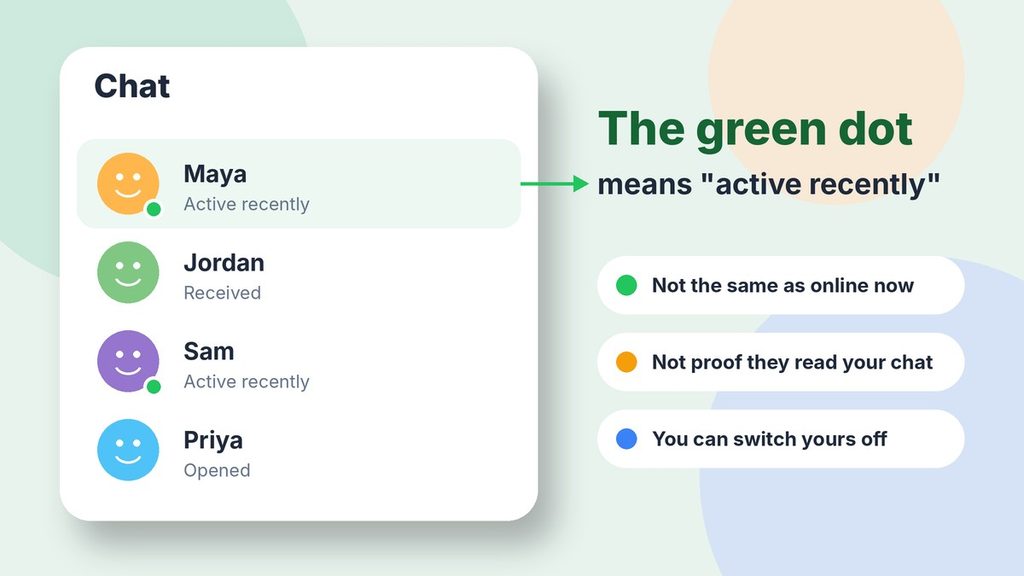
The green dot on Snapchat is an activity indicator. It appears on a friend’s avatar and means that person has been active on Snapchat recently. It does not prove they are online at this exact moment.
Snapchat describes it in almost the same way. According to the official Snapchat Support page, the dot shows that a friend has been active on the app recently.
The key word here is recently. Snapchat does not publish an exact time window. For example, some guides say about 24 hours. Others treat the dot as an “online now” signal. That is why people argue about it so much.
The safest way to read it is simple. The dot tells you the person opened the app lately. It does not tell you they are glued to it right now.
Quick Facts About the Snapchat Green Dot
- 🟢 Official name: Activity Indicator
- 👤 Where it shows: On a friend’s avatar or Bitmoji
- ⏱️ What it means: The friend was active recently
- 🔒 Can you hide it? Yes, in your privacy settings
- ⚠️ What it is not: Proof that someone is online or reading your chat
The Simple Meaning of the Green Dot on Snapchat
Let’s make this really easy. First, think of the green dot like a lit window in a house.
When the light is on, someone has probably been home lately. But the light does not tell you they are standing at the door. They might be in the kitchen. They might be asleep on the couch.
The same logic works here. So a green dot means, “This friend used Snapchat lately.” Nothing more.
So what happens when you see no dot at all? That usually means one of three things:
- The friend has not been active on Snapchat recently.
- The friend turned the activity indicator off.
- Your app version shows the feature differently.
Notice what is missing from that list. Also, a missing dot does not mean someone blocked you. It also does not mean they removed you as a friend. Still, many people jump to that conclusion, and it is almost always wrong.
Where Do You See the Green Dot on Snapchat?
You can spot the dot in a few places. However, one of them has nothing to do with your friends at all. So let’s walk through each one.
On Your Chat Screen
This is the most common spot. First, open the Chat tab and look at your friends’ avatars. If someone has been active recently, a small green dot appears on their picture.
You may also see it when you open a friend’s profile. The exact placement can shift a little between app updates. So if you do not see it right away, look closely at the avatar edges.
On Snap Map and Profiles
Snap Map works a bit differently. For instance, when a friend shares their location, you can tap their Bitmoji. You may then see a line such as “Last active just now” or “Last active 2 hours ago.”
This gives you a more precise idea of timing than the dot does. However, it only works if your friend shares their location. If they use Ghost Mode, their location stays hidden.
On Your Phone Camera (A Different Green Dot)
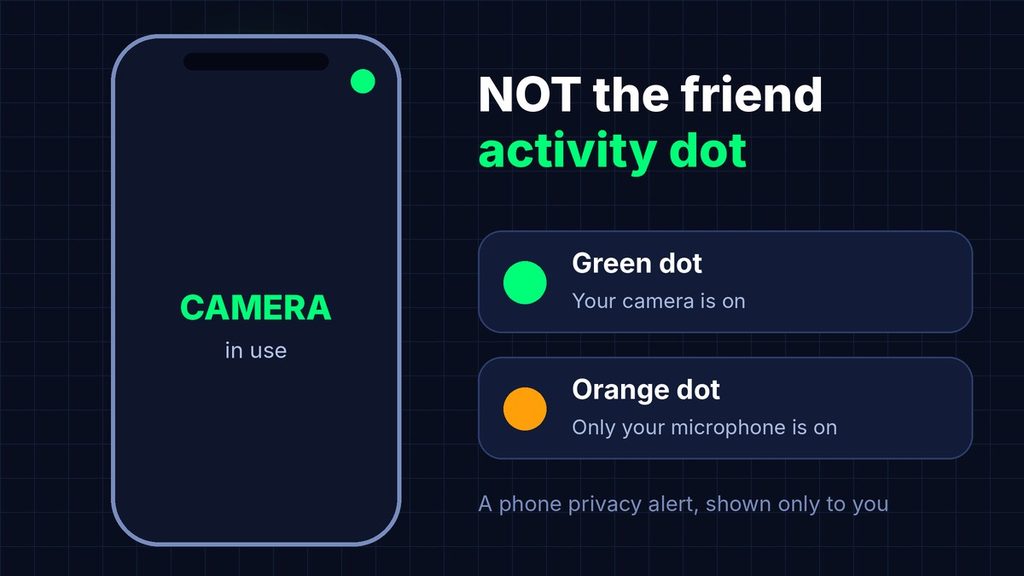
Here is where many people get mixed up. Your phone can also show a green dot near the top corner of the screen. That dot is not the friend activity dot.
Instead, it is a privacy alert from your phone. It appears when an app, such as Snapchat, is using your camera. On iPhone, an orange dot means that only the microphone is active. Android phones show a similar green dot when the camera or microphone is in use.
Only you see this dot. It simply protects your privacy by showing which hardware is running. If it shows up while you take a Snap, that is completely normal. 👍
Why Does Snapchat Show a Green Dot?
Snapchat has not listed every reason in public. Still, the benefits are easy to see. A tiny signal like this makes chatting feel more alive.
Here is why the feature is useful:
- It sets expectations. If a friend was active recently, a quick reply feels more likely.
- It removes some guesswork. You do not have to wonder whether a friend uses the app at all.
- It encourages real conversation. People start chatting when they see a friend nearby.
- It helps with timing. You can pick a better moment to send an important message.
Why Do People Care So Much About It?
Humans love clues. In fact, we want to know if someone is around, especially when we sent a message and heard nothing back.
The green dot gives you a small clue. As a result, it becomes easy to read too much into it. A friend who is active but quiet may simply be busy. For example, they could be watching Stories, checking Spotlight, or answering someone else.
Is the Green Dot on Snapchat a Privacy Risk?
For most people, the answer is no. The dot only shows general activity, so it does not reveal what you do inside the app, who you talk to, or where you are.
Still, privacy is personal. For example, some people do not like sharing even a small signal about their habits. That is a fair choice, and Snapchat gives you a setting for it. As a result, you can enjoy the app on your own terms.
Also, keep in mind that your friends decide for themselves. If a friend hides their dot, respect that. It says nothing about how they feel about you.
Real-Life Examples of the Green Dot on Snapchat
Examples make everything clearer. So here are three situations you may recognize.
Example 1: Planning a Weekend Trip
Maya wants to ask her friend Jordan about Saturday’s plan. She opens Snapchat and sees a green dot on his avatar.
Then she sends a quick message. Jordan replies within a few minutes. In this case, the dot worked as a helpful hint that he was around.
Lesson: The dot can help you pick a good time to message someone.
Example 2: The Message With No Reply
Sam sends Priya a long message at night. He sees her green dot and feels hurt when she does not answer.
The next morning, however, Priya explains that she checked Snapchat for ten seconds and went back to studying. She never opened his chat.
Lesson: A green dot shows activity in the app. It does not show that someone read your message. ⚠️
Example 3: Hiding the Dot for Peace of Mind
Alex gets a lot of messages from classmates and coworkers. Every time he opens Snapchat, people notice the dot and expect an instant answer.
So he switches off his activity indicator. Now he can check his Snaps in peace and reply when he is ready.
Lesson: If the dot adds pressure, you can turn it off in a few taps.
Green Dot on Snapchat vs Similar Signals
Snapchat has several small signals that look alike. Mixing them up leads to wrong guesses. Therefore, this table shows how they differ. 📊
| Signal | Where You See It | What It Tells You | Real-Time? |
|---|---|---|---|
| Green dot (activity indicator) | On a friend’s avatar | The friend was active recently | Not exactly |
| “Last active” on Snap Map | After tapping a friend’s Bitmoji | How long ago the friend was active | Closer to it |
| Typing indicator | Inside a chat | The friend is writing to you | Yes |
| “Opened” status | Under your Snap or chat | The friend opened that message | Yes, for that message |
| Phone camera dot | Top corner of your phone | Your own camera or microphone is on | Yes, but only about you |
Look at the last row again. Notice that the phone dot is about your device. The other four tell you something about your friends or your messages.
Which Signal Should You Trust Most?
If you want to know whether someone read your message, then trust the “Opened” status. If you want to know whether someone is typing, trust the typing indicator.
The green dot is more of a general hint. It is helpful, but still it is the weakest proof of the group.
How to Read the Green Dot on Snapchat the Smart Way
A dot alone tells you very little. However, when you combine it with other clues, you get a much clearer picture.
Step 1: Look at the Time of Day
First, think about when you sent the message. A dot at 2 a.m. may mean your friend woke up and checked a notification. A dot at 4 p.m. may mean they are on a break.
Step 2: Check the Chat Status
Next, look under your message. “Delivered” means the message reached them. “Opened” means they saw it. Therefore, if the status still says “Delivered,” they have not read it yet, even with a green dot.
Step 3: Think About Their Habits
Some people check Snapchat all day but reply once at night. Others answer within seconds. So use what you already know about your friend. Their habits tell you more than any dot can.
Step 4: Be Patient Before You Follow Up
Finally, give the chat some time. Instead of sending a second and third message, wait a few hours. If the topic is urgent, a phone call is a better choice than watching for dots.
What If You See the Dot but Get No Reply?
This happens to everyone. Still, it rarely means anything personal. Your friend may be busy, tired, or simply unsure what to say.
For example, someone might open the app to check a Story and then close it. The dot appears, but your message stays unread. In that case, no one did anything wrong. 💬
When Should You Hide the Green Dot on Snapchat?
There is no single right answer. Instead, it depends on how you like to use the app. Here are some guidelines.
Keep It On If You…
- Chat with close friends who like quick replies
- Do not mind people knowing you were active lately
- Want friends to feel free to message you
Turn It Off If You…
- Feel pressure to reply the moment you open the app
- Prefer more privacy about your habits
- Get many messages from people you do not talk to often
- Want to watch Stories without everyone noticing you are around
Remember, you can change your mind any time. Also, the switch takes only a few seconds. 😊
Common Misunderstandings About the Green Dot on Snapchat
A lot of myths float around online. So let’s fix the biggest ones.
Myth 1: “A Green Dot Means They Are Online Right Now”
Not always. In fact, Snapchat says the dot shows recent activity. The person may have left the app a while ago.
Myth 2: “A Green Dot Means They Read My Message”
No. Instead, reading a message shows up as “Opened” in your chat. The dot is a separate signal.
Myth 3: “They Are Ignoring Me”
Unlikely, because people open Snapchat for many reasons. They may be posting a Story, watching videos, or replying to someone else. Giving them the benefit of the doubt saves you stress.
Myth 4: “No Dot Means They Blocked Me”
This one causes a lot of drama. However, a missing dot has several simple explanations. The friend may be inactive or may have switched the feature off. If you suspect a block, the dot is not a reliable test.
Myth 5: “Ghost Mode Hides the Green Dot”
Ghost Mode hides your location on Snap Map. It is a different setting from the activity indicator. If you want to hide the dot, you must change the activity indicator setting itself.
Myth 6: “The Phone Camera Dot Is the Same Thing”
It is not. Instead, the green dot at the top of your phone is a hardware alert. It is not a message about your friends.
Pro Tips for Using the Green Dot on Snapchat
Next, these practical tips will help you get the most out of the feature and avoid awkward moments.
How to Turn Off the Activity Indicator
Follow these steps. Menu names can shift a little between app versions, but the path is close to this:
- Tap your profile icon in the top-left corner.
- Tap the gear icon to open Settings.
- Go to App & Privacy, then My Privacy & Data.
- Under Privacy Choices, tap Activity Indicator.
- Switch the toggle off.
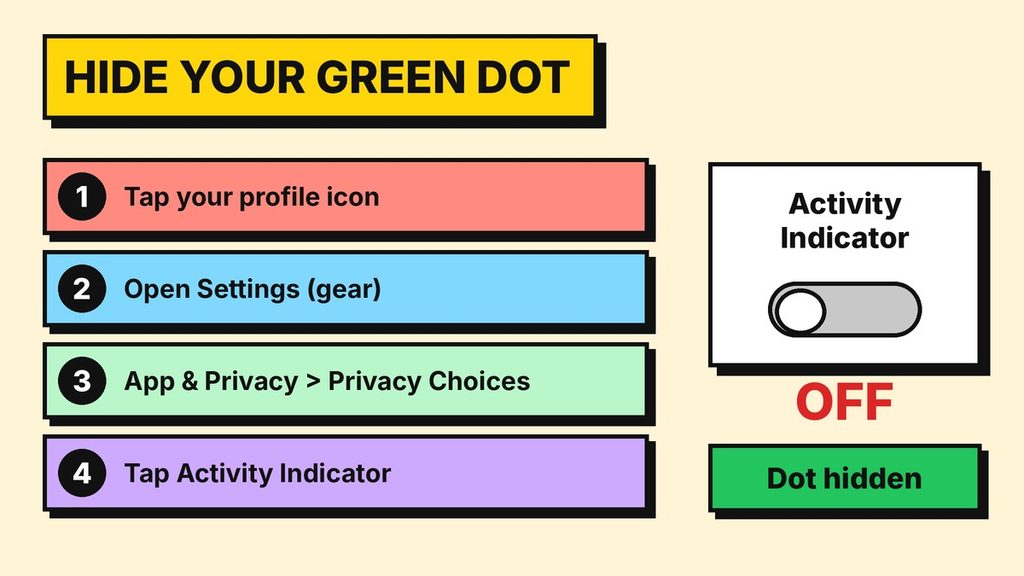
To turn it back on, follow the same steps and flip the toggle on. Also, Snapchat leaves the feature on by default, so you only need to act if you want to hide it.
More Tips Worth Remembering
- Use the dot as a hint, not a fact. It is a clue, and clues can be wrong.
- Do not text-bomb a friend with a green dot. Sending ten messages in a row feels pushy.
- Check “Opened” for proof. That status tells you far more than the dot.
- Test your settings. After you change a toggle, look at how the app behaves on your own phone.
- Keep the app updated. Snapchat changes its design often, and icons may move.
- Talk to your friends. If the dot causes tension, a simple chat fixes more than any setting.
A Quick Safety Note for Parents and Teens
Privacy settings matter, especially for younger users. So take a few minutes to review the privacy choices together. You can decide who contacts you, who sees your Stories, and whether your activity shows up.
If a phone camera dot appears when Snapchat is closed, check which apps have camera permission. That is also a good habit for any app on your phone. 🔒
Final Thoughts on the Green Dot on Snapchat
The green dot on Snapchat is a small feature with a simple job. It shows that a friend was active on the app recently. That is all.
The dot does not prove someone is online. Likewise, it cannot show that they read your message. Above all, it does not mean anyone is ignoring you.
When you see one, treat it as a friendly hint. If the dot ever makes you feel stressed, you can switch yours off in a few taps. You are in control of your own privacy. 💚
Now that you know the real meaning, you can finally stop overthinking those tiny circles and enjoy your chats.
FAQ: Green Dot on Snapchat
Does a green dot on Snapchat mean someone is online right now?
Not necessarily. Instead, the dot means a friend was active on Snapchat recently. Snapchat does not give an exact time. So the person may be online now, or they may have left a little while ago.
Can I hide the green dot on Snapchat?
Yes. First, open your profile, tap the gear icon, go to App & Privacy, and open My Privacy & Data. Then tap Activity Indicator under Privacy Choices and switch it off. Also, you can turn it back on at any time.
Why can’t I see a green dot next to my friend?
There are a few simple reasons. First, your friend may not have been active recently. Second, they may have switched off their activity indicator. Third, your app may also show the feature a bit differently. A missing dot does not mean you were blocked.
What is the green dot at the top of my phone when I use Snapchat?
That dot comes from your phone, not from Snapchat. Instead, it tells you that an app is using your camera or microphone. On iPhone, an orange dot means only the microphone is on. Only you can see it.