
You open Snapchat, scroll through Quick Add, and spot a tiny green dot next to a name. Suddenly, your mind starts racing. 🤔
Are they online right now? Are they ignoring you? Did they just see your message?
So, what does the green dot mean on Snapchat? In short, it shows that a person was recently active on the app. It does not promise that they are staring at your chat this second.
In this guide, you will learn what the dot really tells you and where you can see it. You will also learn how to hide yours, and why it confuses so many people. Along the way, you will get real examples, a comparison table, and quick answers to the most common questions. 🔥
What Does the Green Dot Mean on Snapchat? 🟢
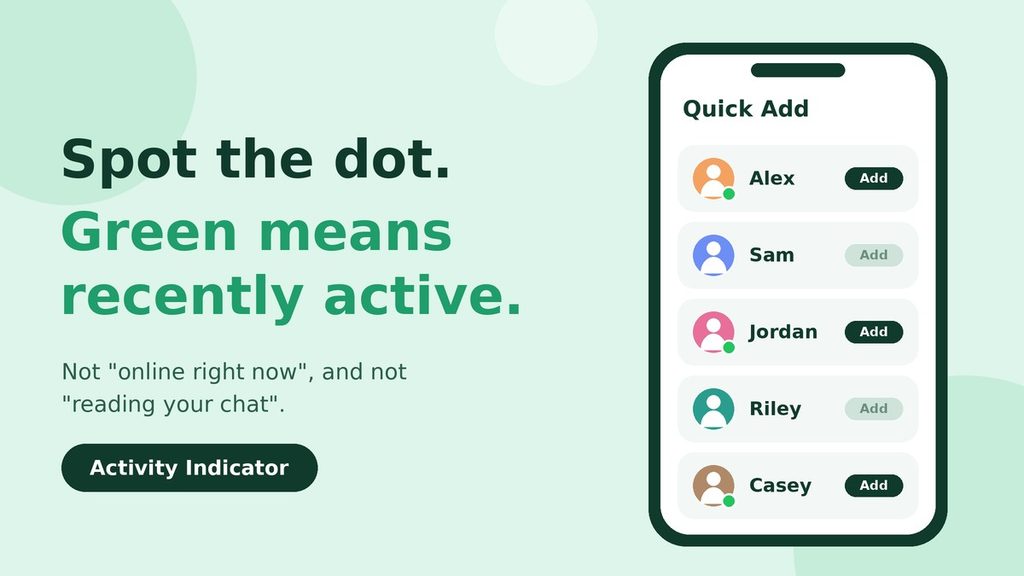
Quick answer: The green dot on Snapchat is called the Activity Indicator. It means that person was recently active on the app. It does not prove they are online right now or reading your chat.
Snapchat uses the green dot as a small status light. When it sits next to someone’s name, the app is telling you that this person opened or used Snapchat not long ago.
That is all. The dot does not tell you what they did. It also does not tell you whether they saw your Snap, replied to someone else, or just checked the camera for two seconds.
The Two Green Dots You Might See
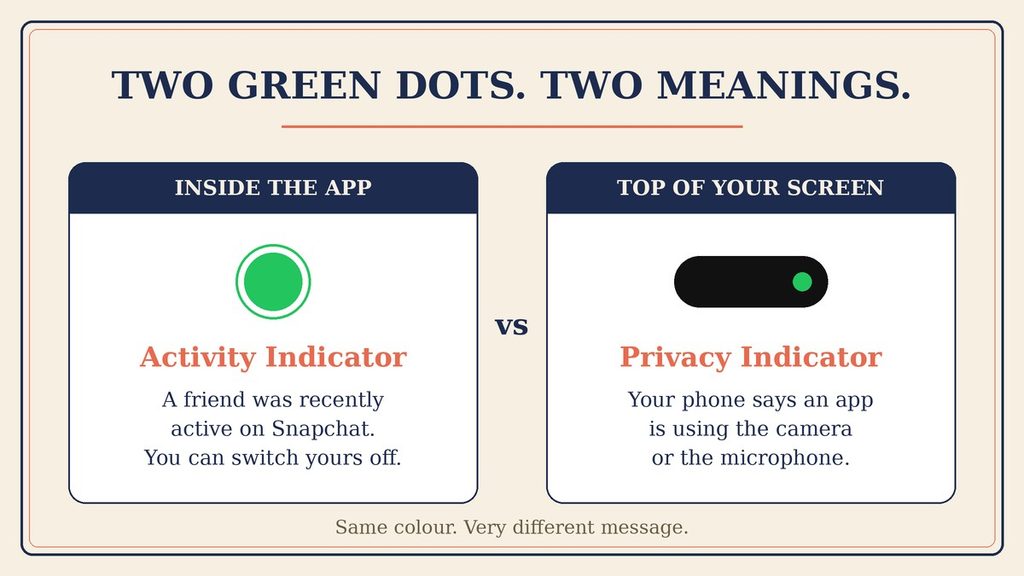
Here is where things get confusing. There are actually two different green dots, and they mean very different things.
- The Activity Indicator (inside Snapchat): a green dot next to a person’s name or avatar. It signals recent activity.
- The privacy indicator (on your phone): a small green dot at the top of your screen. Your phone shows it when any app is using the camera or microphone, including Snapchat.
Because both are green, people often mix them up. However, the second one has nothing to do with friends. It only tells you about your own phone. ✅
The Simple Meaning of the Snapchat Green Dot in Plain Words
Think of a lit window in a house. A light means someone was home recently. But it does not mean they are standing at the door waiting for you.
The green dot works the same way. It says, “This person has been around Snapchat lately.” Nothing more.
Snapchat does not publish an exact timer for the dot. Some guides say it fades after a few minutes. Others say it can last up to a day. In real life, it can also lag a little because of weak internet or app glitches.
So, treat it like a hint. Do not treat it like proof. 🧠
What Makes the Dot Show Up?
Snapchat does not publish a full list of triggers. Even so, the basic idea is simple. When a person opens the app and uses it, the app marks them as active.
That is why a very short visit can light the dot. For example, a quick look at your Stories or a few seconds in the camera view may be enough. The dot does not care how long the visit lasted.
Because of this, the dot says very little about why someone opened Snapchat. They could be chatting, posting, or just checking the time of a notification. Nobody outside can tell. 🤷
Where Do You See the Green Dot on Snapchat?
You will not see the dot everywhere. Snapchat changes its layout often, so the exact spots can vary by app version. Still, these are the places people report most often:
- Quick Add and Add Friends: next to suggested people, so you can see who is active lately.
- Next to a profile picture or Bitmoji: in some versions, you may see it when you open a person’s profile from your chat list.
- Only for people who left it on: if someone switched the feature off, you will not see a dot for them at all.
Also, remember this simple rule. If you turn your own Activity Indicator off, you lose the ability to see other people’s dots too. It works both ways. 🔁
Why Do People Care About the Green Dot on Snapchat?
It looks like a tiny detail. Even so, a small signal can carry a lot of emotion when you are waiting for a reply. 💬
Why People Check It
- To find active friends: if you want a quick chat, an active person is more likely to answer soon.
- To avoid awkward silence: some people like to know whether a quiet chat is just a busy day.
- To feel connected: seeing that a close friend is around can feel nice, even without a message.
- To satisfy curiosity: let’s be honest. Sometimes we just want to know. 😅
Why Some People Switch It Off
- Privacy: they do not want others to track when they open the app.
- Less pressure: if people see you were active, they may expect a fast reply.
- Peace of mind: turning it off removes the guessing game for everyone.
Neither choice is wrong. It simply depends on how open you want to be. 🙂
Real-Life Examples of the Snapchat Green Dot
Examples make this easier. Here are five everyday situations and what the dot really tells you in each one.
Example 1: A New Person in Quick Add
You see “Maya” in Quick Add with a green dot. That means she was active recently. So, she may notice your friend request sooner than someone who has not opened the app in weeks. ✅
Example 2: Your Friend Hasn’t Replied
You send a Snap at lunchtime. Later, you see a green dot next to your friend’s name, but no reply arrives. This does not mean they are ignoring you. They may have opened the app to post a Story and left right away.
Example 3: A Group Plan
You are planning a weekend trip with four people. Two of them show green dots. In this case, you can message those two first and ask them to nudge the others. It is a small shortcut that saves time.
Example 4: No Dot at All
You notice that a friend never shows a green dot. Maybe they have not been active. However, it is also possible they turned the feature off. Without more clues, you cannot know which one it is. ⚠️
Example 5: Your Own Dot
You check Snapchat for ten seconds on the bus. Then you close it. For a while, other people who use the feature may see a dot next to your name. If that feels like too much exposure, you can switch it off, and we will show you how below.
Green Dot on Snapchat vs Similar Indicators
Many apps use green dots, and each one has its own rules. This table shows how they differ, so you do not mix them up.
| Indicator | Where you see it | What it usually means | Real-time? |
|---|---|---|---|
| Snapchat green dot (Activity Indicator) | Quick Add, Add Friends, some profiles | The person was recently active on Snapchat | No, it is a loose hint |
| Phone privacy dot | Top of your phone screen | An app is using your camera or microphone | Yes, but only for your own phone |
| Instagram green dot | Direct Messages | The person is active on Instagram | Closer to live |
| WhatsApp “online” | Chat header | The person has the app open right now | Yes |
| Snap Map “last active” | Friend’s profile or map | Shows when a friend was last seen, if they share it | Roughly, unless Ghost Mode is on |
As you can see, Snapchat’s dot is the loosest of the group. Because of that, it is better for a rough guess than for a clear answer.
Green Dot vs Ghost Mode
Ghost Mode is a Snap Map setting. It hides your location from friends. It is separate from the Activity Indicator.
So, you can have Ghost Mode on and still show a green dot. Likewise, you can hide the dot and still share your location. Each setting does its own job. 👻
When Should You Trust the Green Dot on Snapchat?
The dot is useful in some moments and misleading in others. Use this quick guide.
Good Times to Rely on It
- When you want to pick who to message first in a group plan.
- When you are browsing Quick Add and want to see who is around.
- When you only need a rough idea, not a firm answer.
Times to Be Careful
- When you feel anxious about a slow reply.
- When you are about to assume someone is ignoring you.
- When you need to confirm that a person saw something important.
For urgent matters, send a normal text or make a call instead. A dot should never be your only source of truth. 📞
How to Hide Your Green Dot on Snapchat
If you prefer more privacy, you can switch the dot off in a minute. First, open Snapchat. Then follow these steps:
- Tap your Bitmoji or profile icon in the top-left corner.
- Tap the gear icon in the top-right to open Settings.
- Scroll down to Privacy Controls.
- Tap Activity Indicator.
- Switch the toggle off.
Menu names can change after app updates. If you cannot find the option, check the Snapchat Support page for the latest steps.
Once it is off, people can no longer see your dot. In return, you also stop seeing theirs. 🔒
Should You Turn It Off? A Quick Decision Guide
Not sure what to pick? Ask yourself these questions.
- Do you feel pressure to reply fast? Then turning the dot off can give you breathing room.
- Do you like seeing who is around? Then keeping it on is probably fine.
- Do you share your account with younger family members? Then talk about privacy together and choose the setting as a team.
- Do you chat mostly with close friends? Then the dot is low risk, because they already know your habits.
You can always change your mind later. The toggle takes seconds, and nothing is permanent. ✅
Is the Snapchat Green Dot a Privacy Risk?
For most people, the risk is small. The dot shares only one thing: that you were recently active. It does not share your messages, your location, or your Snaps.
However, small details can add up. If a person watches your dot over many days, they may learn when you usually wake up or go to bed. That pattern is something you might not want to share with everyone.
Here is a simple way to decide. If you would be fine with a casual acquaintance knowing that you are often on Snapchat in the evening, keep the dot on. If that sounds uncomfortable, switch it off. 🔐
Also, review who is on your friends list from time to time. Remove people you no longer talk to. That small habit protects your privacy far more than any single toggle.
Common Misunderstandings About the Snapchat Green Dot
Let’s clear up the myths that cause the most drama.
Myth 1: “Green means they are online right now.”
Not quite. The dot points to recent activity, so the person may have left the app already. ❌
Myth 2: “Green means they read my message.”
No. The dot does not track messages. To see whether a Snap was opened, you need to look at the chat status instead.
Myth 3: “No dot means they blocked me.”
Not necessarily. They may be inactive, or they may have turned the feature off. Blocking is a completely different thing.
Myth 4: “The green dot at the top of my phone is a friend.”
That one belongs to your phone, not to Snapchat friends. It simply shows that an app is using your camera or microphone. If it appears when you are not using Snapchat, check which app is responsible. ⚠️
Myth 5: “I can use the dot to track someone.”
The dot is a loose, low-detail signal. It does not show where a person is or what they are doing. Besides, watching someone’s activity too closely rarely leads to a healthy friendship.
How to Read the Green Dot on Snapchat in 30 Seconds
Short on time? Use this tiny checklist whenever you spot a dot and wonder what it means.
- Check where you see it. Inside the app, it is the Activity Indicator. At the top of your phone, it is the privacy dot.
- Ask what you actually want to know. If you want to know whether someone saw your message, the dot cannot answer that.
- Remember the time gap. The dot can be a few minutes or even hours behind real life.
- Look for a second clue. A reply, a new Story, or a recent Snap can add context.
- Take the kind option. If it matters, send a short message and wait.
That is it. Five quick steps, and you avoid most of the stress. 🙌
One More Real-Life Scenario
Imagine you sent your cousin a Snap about a family dinner. A few minutes later, you see a green dot next to their name. Your first thought might be, “They saw it and ignored me.”
But think again. The dot only says they were recently active. They may have opened the app to answer someone else, and your Snap may still be waiting in the inbox. A friendly nudge later is a better plan than a worried guess. 😊
Pro Tips for Using the Green Dot Wisely
- Read it as a hint. A dot is a clue, not a confession. 🕵️
- Do not build stories around it. Silence usually has a boring explanation, like a busy day.
- Use another channel for urgent news. Call or text when timing matters.
- Review your privacy settings once in a while. Apps change, so a quick check keeps you in control.
- Respect other people’s choices. If a friend hides their dot, they probably want more space. That is fine.
- Update your app. Newer versions usually fix small bugs that make status icons lag.
- Combine clues carefully. Snap Map or a Snap Score change can add context, but none of them is perfect.
Final Thoughts: What the Green Dot Really Tells You
So, what does the green dot mean on Snapchat? It means someone was recently active. It is a soft signal, not a live broadcast.
Once you understand that, the dot stops being scary. You can enjoy the small convenience it offers, and you can switch it off if you want more privacy. 🎯
Most importantly, do not let a tiny circle decide how you feel about a friendship. If you want an answer, just send a message. It is simpler, kinder, and far more reliable.
FAQ: Green Dot on Snapchat
What does the green dot mean on Snapchat in one line?
It means the person was recently active on Snapchat. It does not prove they are online right now or that they saw your message.
How long does the green dot stay on Snapchat?
Snapchat does not share an exact time. Reports range from a few minutes to about a day. App lag can also make the dot appear late or stay longer than expected.
Can people see a green dot if I turn it off?
No. After you switch off the Activity Indicator in Privacy Controls, others cannot see your dot. You will also lose the ability to see theirs.
Is the green dot at the top of my phone related to Snapchat?
Not as a friend signal. That dot comes from your phone and shows that an app is using the camera or microphone. If you see it unexpectedly, open your privacy settings and check which app is using them. 🔍