You open a server and scroll through the member list. Then you spot it: a tiny phone icon sitting on someone’s profile picture. 🤔
Is it a call? Is it a notification? Did that person just message you? Take a breath. You are not the first person to wonder what the phone icon means on Discord, and you will not be the last.
Here is the short answer. That little icon means the person is online on the Discord mobile app and not on a computer. That is all. There is no secret code and no hidden message. ✅
However, the full story is more interesting. In this guide, you will learn what the icon shows, where you can see it, and what it does not mean. You will also learn how to hide it when you want some privacy. Let’s dive in. 🔥
What Does the Phone Icon Mean on Discord? (Quick Answer)
The phone icon on Discord means a user is active on Discord from a mobile device, such as an iPhone or Android phone, and is not using the desktop app or a web browser. Discord shows it in place of the usual green online dot.
Many people call this feature mobile presence or the mobile status indicator. Both names point to the same thing: a small phone-shaped marker that tells you how someone is connected.
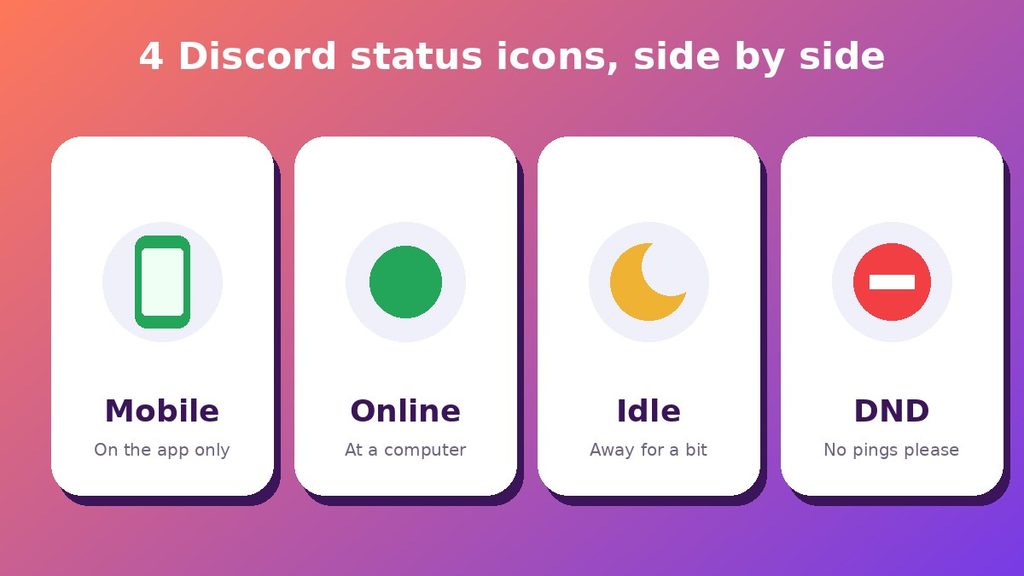
Here is the quick version in a list:
- 📱 Phone icon: the person is online on the mobile app only
- 🟢 Green dot: the person is online, usually on a computer
- 🌙 Moon: the person is idle
- ⛔ Red minus sign: the person set Do Not Disturb
- ⚪ Gray ring: the person is offline or invisible
So when you wonder what does the phone icon mean on Discord, think “this person is on their phone right now.” Nothing more, nothing less.
The Simple Meaning in Plain Words
Imagine you walk past a friend’s house. If their car is in the driveway, you know they are probably home. The phone icon works in a similar way.
It does not tell you why they are online. It only tells you how they are online. They might be on the bus, in bed, or waiting in line for coffee. ☕
Therefore, the icon gives you a small clue about the person’s situation. A mobile user may reply slower than someone sitting at a desk. They may also skip long messages, because typing on a phone takes more effort.
That is why many people find the icon helpful. It helps you set your expectations before you send a message.
Why Does Discord Use a Phone Shape and Not a Dot?
Discord wanted people to tell mobile users apart from desktop users at a glance. A plain green dot could not do that job. So the app swaps the dot for a tiny phone outline when the person is active on mobile only.
Because the shape is different, you can spot it quickly. You do not need to open anyone’s profile or ask where they are.
Where Does the Discord Phone Icon Show Up?
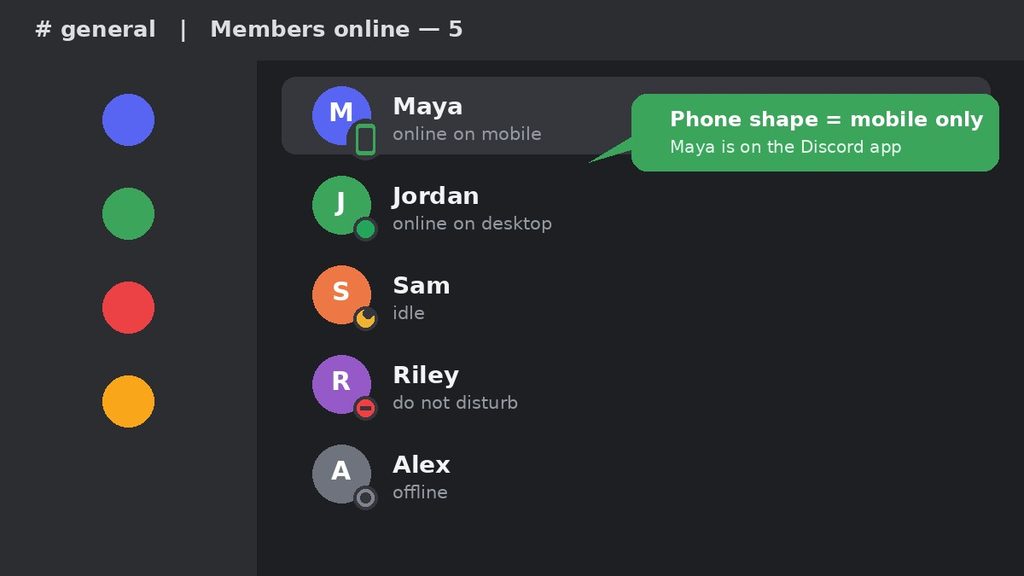
You can see the phone icon in several places across Discord, and the meaning stays the same everywhere. It sits on or beside the person’s profile picture, so it follows them around the app.
Common places to spot it
- The member list on the right side of a server
- Your direct messages list on the left
- Your Friends tab under the “Online” section
- Group chats where several people talk together
- Profile pop-ups when you click or tap a username
The icon works on both the desktop app and the mobile app. In other words, you can see someone else’s phone icon from your computer, and you can see it from your own phone.
Where you will not see it
Before we go on, remember the key point. When people ask “what does the phone icon mean on Discord?” they usually mean the status marker, so that is the one we cover here.
You will not see the phone icon when the person is offline. You also will not see it if they appear invisible. In both cases, Discord shows the gray offline ring instead.
Likewise, the icon usually will not show when the person is on a computer. If someone uses Discord on desktop and on mobile at the same time, you will generally see the normal desktop status. The phone shape is mainly for people who are active on mobile alone.
Why Do People See the Phone Icon on Discord?
Nobody picks this icon on purpose. Discord adds it automatically when it detects that you are using the mobile app. You do not need to switch anything on.
Still, the feature exists for good reasons. Here are the main ones:
- It sets expectations. You know a reply may take longer.
- It saves time. You can skip a long, detailed message if the person is on the go.
- It adds context. You understand why someone is online at odd hours.
- It prevents confusion. You can tell the difference between “at the computer” and “on the phone.”
For gamers, this matters a lot. Say you are planning a match and you need everyone at their PC. A quick look at the member list shows who is ready and who is still on the couch with a phone. 🎮
How Discord Decides to Show the Phone Icon
Many readers ask a follow-up question after they learn what does the phone icon mean on Discord in simple terms. They want to know how the app decides when to show it. The answer is fairly simple.
Discord looks at how your account is connected. If you are signed in on the mobile app and nowhere else, the app marks you as a mobile user. As a result, other people see the phone shape beside your name.
What happens when you use two devices
Things change when you log in on more than one device. For example, you may have Discord open on your laptop and on your phone. In that case, other people usually see your regular desktop status. The phone shape mostly appears when your phone is the only active device.
What happens when you stop using the app
When you lock your phone and leave the app alone, Discord does not keep you “active” forever. After a while, the app may show you as idle or offline. Once that happens, the phone shape disappears, and your friends see a different icon.
Therefore, the icon is a live signal. It changes as you move between devices and as your activity changes. Do not worry if it comes and goes during the day. That is normal.
Is the Discord Phone Icon a Privacy Problem?
Some people feel uneasy about the icon. They ask, “Does it share too much about me?” That is a fair question, so let’s look at the facts.
The phone icon shares one small detail: you are on mobile. It does not share your location, your phone model, your phone number, or your battery level. It also does not reveal what you are doing inside the app.
For most people, this is harmless. Still, you may prefer extra privacy in some cases. For instance, you might not want a boss or a stranger to know you are online late at night. In that situation, Invisible mode is your best option. You will learn the steps in the pro tips section below.
On the other hand, you may like the icon because it explains your slow replies. Friends often understand when they see you are on your phone. In other words, the icon can actually make chats smoother and kinder. 💬
Real-Life Examples of the Discord Phone Icon
Examples make everything clearer. Here are four situations you may recognize.
Example 1: The study group
You are in a study server with classmates. You see a phone icon next to Priya’s name at 7 a.m. That likely means she is checking messages on her way to class.
So you keep your question short. Instead of sending a long essay, you write, “Hey, did you finish question 4?” She can answer in ten seconds.
Example 2: The gaming squad
You want to start a ranked match at 9 p.m. Three friends have a green dot. One friend, Marcus, has a phone icon.
That tells you Marcus is probably not at his console yet. You can message him, “Hop on when you’re ready!” and start the lobby once he sits down.
Example 3: The work server
Many small teams use Discord for work chat. If your manager shows a phone icon on a Saturday, they might be checking in lightly. Therefore, you may not need to send anything urgent that needs a quick desktop reply.
Example 4: The late-night chat
Your best friend has a phone icon at midnight. They are likely lying in bed, scrolling. That is a perfect moment for a casual chat, but not for a long file transfer. 😄
Phone Icon vs Similar Discord Status Icons
The phone icon is only one of several signs you will see. Mixing them up is very common. This table keeps things simple.
| Icon | What it means | Can you expect a fast reply? |
|---|---|---|
| 📱 Phone shape | Online on mobile only | Maybe, but short messages work best |
| 🟢 Green dot | Online and active | Usually yes |
| 🌙 Yellow moon | Idle or away for a while | Not always |
| ⛔ Red minus | Do Not Disturb | No, notifications are muted |
| ⚪ Gray ring | Offline or invisible | Not right now |
Phone icon vs the moon icon
The moon means the person is idle. Discord sets this status when you have not touched the app for a while. The phone icon is different, because it describes the device and not the activity level.
Phone icon vs Do Not Disturb
Do Not Disturb is a choice. The person turned it on to silence notifications. The phone icon is not a choice, because Discord adds it on its own. When someone is on mobile and also idle or on Do Not Disturb, you will usually see those statuses instead of the phone shape.
Phone icon vs the call button
This one trips up many new users. The call button is a phone handset icon near the top of a direct message. You tap it to start a voice call. The phone icon next to a profile picture is a status marker. They look related, but they do completely different jobs.
When Should You Use What the Discord Phone Icon Tells You?
First, a quick note. You cannot “use” the phone icon like a command. Still, you can use what it tells you. Here are the best moments to pay attention to it.
- ✅ Before sending a long message. A mobile user may prefer short text.
- ✅ Before starting a game session. Check who is actually at a computer.
- ✅ Before sharing files or large links. Phones can be slower with big downloads.
- ✅ When timing a serious chat. Someone on the go may not be ready for a deep talk.
On the other hand, do not treat the icon as a rule. A person on mobile may still reply instantly. Meanwhile, a person on desktop may ignore you for an hour. The icon is only a hint.
Common Misunderstandings About the Phone Icon
Because the icon is so small, people read too much into it. Even after reading “what does the phone icon mean on Discord?” online, many people still believe a few myths. Let’s clear up the biggest myths. ⚠️
Myth 1: “They are on a call with me”
No. The icon does not mean the person is in a voice call. Voice calls show up in other ways, such as a call banner or a voice channel listing.
Myth 2: “They are texting someone else”
The icon does not say what the person is doing. They could be reading a server, watching a stream, or just scrolling. It shows the device and nothing about the activity.
Myth 3: “It shows their location”
It does not. The phone icon tells you nothing about where the person is. It does not show a city, a country, or even whether they are at home.
Myth 4: “A phone icon means they are ignoring me”
Not at all. Maybe they have not seen your message yet. Maybe the notification is muted. Try not to take it personally. 💛
Myth 5: “The icon means their battery is low or their phone is ringing”
Discord does not share battery levels or phone calls. The marker has one meaning only: mobile presence.
Myth 6: “It is a custom status I can pick”
You cannot choose the phone icon. However, you can type a 📱 emoji into a custom status. That emoji looks like a regular emoji, and it appears next to your status text. It does not work like the automatic phone icon.
Pro Tips for Using and Hiding the Discord Phone Icon
You now have a clear answer to “what does the phone icon mean on Discord?” so here are some practical tips. They will help you read statuses faster and protect your privacy.
Tip 1: Look at the whole picture
Check the icon, the status text, and the last message time together. One small clue is never enough. Three clues give you a much better guess.
Tip 2: Keep messages short for mobile users
If you see the phone shape, write in short sentences. Ask one question at a time. This makes it easy for the other person to answer quickly.
Tip 3: Do not overthink it
The icon is just a helper. If you need an answer, send the message anyway. People can read it whenever they are ready.
Tip 4: Hide the icon with Invisible mode
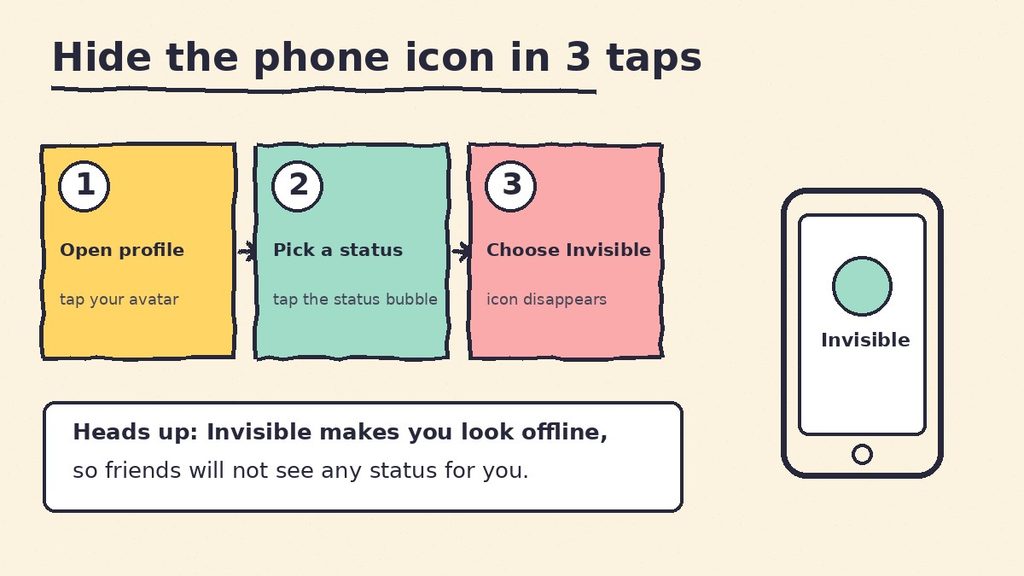
Do you want to use Discord on your phone without showing the icon? You can set your status to Invisible. Discord says this removes the mobile marker and makes you look offline to others.
Here is how it works on most phones:
- Open the Discord app.
- Tap your profile picture at the bottom right.
- Tap your current status.
- Choose Invisible.
Menu names and layouts can change when Discord updates the app. If you do not see these exact options, look for “Set Status” in your profile area.
Tip 5: Know the trade-off
Invisible mode hides the icon, but it also hides your online status completely. Your friends will see you as offline. You can still read and send messages. However, people may think you are not around.
Tip 6: Close the app when you want a break
If you only want to appear away, simply close the app. After some time, Discord usually stops showing you as active on mobile. You can also mute notifications if you want fewer interruptions.
Tip 7: Respect other people’s space
Seeing someone online does not give you the right to a fast reply. Everyone needs offline time. A quiet response often means the person is busy, not upset.
Final Thoughts: What Does the Phone Icon Mean on Discord?
So, what does the phone icon mean on Discord? It simply means that the person is online on the mobile app and not on a computer. It does not mean they are calling, texting, or ignoring you. 😊
If a friend ever asks “what does the phone icon mean on Discord?” you can now explain it in one sentence. Use the icon as a friendly hint. It can help you pick the right moment and the right message length. Then relax and enjoy your chat.
If you want privacy, set your status to Invisible. If you want to understand your friends better, glance at the full set of status icons. Either way, you now know more than most people on the platform. 🚀
FAQ: What Does the Phone Icon Mean on Discord?
What does the phone icon mean on Discord, and is it a call?
No, it is not a call. The phone icon next to a profile picture only means the person is active on the Discord mobile app. A call usually appears as a ringing banner or a call window. The handset button in a chat is for starting calls.
Can I turn off the phone icon on Discord?
You cannot remove only the icon, but you can set your status to Invisible. Discord removes the mobile marker when you choose Invisible, and you appear offline to other users.
Why do I see a phone icon instead of a green dot?
You see it because the person is active on Discord mobile only. Desktop users show the regular green dot. The shape change helps you tell the two apart at a glance.
Is the phone icon the same as the Idle moon?
No. The moon means the person has been away from Discord for a while. The phone shape describes the device they are using. When someone is both on mobile and idle, you will generally see the status icon instead of the phone shape.