
You open Discord and spot your friend’s name with a grey, empty circle next to it. Offline, right? Then they reply to your message two seconds later. 😳
If that has ever happened to you, you probably asked yourself, what does invisible mean on Discord? You are not alone. Plenty of people search for this every month, and the answer is simpler (and sneakier) than you might expect.
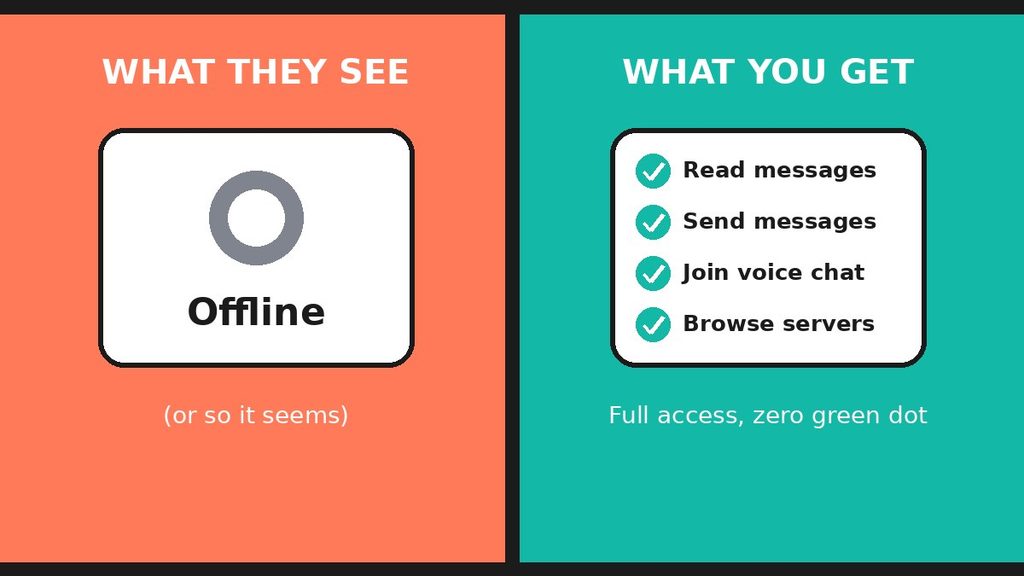
Here is the short version: Invisible is a Discord status that makes you look offline while you stay fully online. You can still chat, join voice channels, and browse your servers. Other people just don’t see your green dot.
In this guide, you will learn how Invisible works and why people use it. You will also see how it compares to Idle, Do Not Disturb, and Offline. Plus, you will get a few clues that can show whether someone is hiding. Let’s dive in. 🔥
What Does Invisible Mean on Discord? 👀
Invisible is one of the four status options on Discord. When you pick it, every other user sees you as offline. Meanwhile, you keep full access to the app.
So, what does invisible mean on Discord in plain terms? It means “I’m online, but I don’t want anyone to know.” That’s it. Nothing is broken, and nothing is hidden from you.
Why does Discord offer this option? Because not everyone wants to be reachable all day. Sometimes you just want to read, watch, or listen without any pressure to reply.
The Four Discord Statuses at a Glance
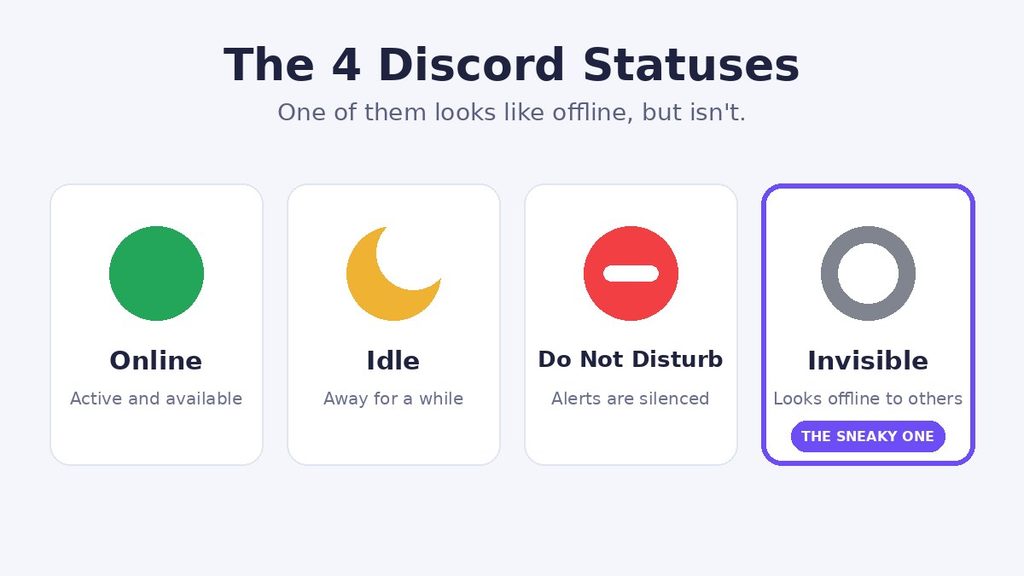
Discord gives you four choices. Here is what each one looks like:
- Online ✅ shows a green dot. It tells everyone you are active and ready to chat.
- Idle 🌙 shows a yellow crescent moon. It means you stepped away for a while.
- Do Not Disturb ⛔ shows a red circle with a line. It also silences your notifications.
- Invisible 👻 shows a grey, hollow circle. To other people, it looks exactly like offline.
Did you notice that last point? Invisible and Offline look the same to everyone else. That is the whole trick.
Invisible Meaning on Discord in Simple Words
Let’s skip the tech talk. What does invisible mean on Discord in plain English? It means “I’m here, but you can’t see me.”
Picture a shop window with one-way glass. You can see everyone outside. They can only see their own reflection. You are inside, fully awake, and nobody knows.
That is Invisible mode. You can watch your servers, read your direct messages, and listen in on conversations. Your name just shows up as offline in the member list and your friends list.
However, it helps to know what Invisible is not:
- It is not a block. The other person can still message you.
- It is not a mute. You still get your messages and alerts.
- It is not leaving. You stay connected the entire time.
In short, Invisible only changes what other people see. It does not change what you can do.
Where Is the Invisible Status Used?
Invisible lives inside Discord itself. You can switch it on from the desktop app, the web browser, or the mobile app on iPhone and Android. Your status follows your account, so it shows up the same way on every device.
People often ask what does invisible mean on Discord for mobile compared to desktop. The answer is the same everywhere. You look offline, and you stay online.
You will see this status used in many places:
- Gaming servers where friends constantly ask you to join a match
- Study groups where you need quiet time to focus
- Friend DMs where you want a break from long chats
- Creator and fan communities where people expect fast replies
- Work or school servers where you want to keep your personal time private
Other apps have similar ideas. Steam has its own Invisible status, and chat apps like WhatsApp and Messenger let you hide when you were last active. Still, the word “invisible” is most popular on Discord.
How to Turn On Invisible Mode on Discord
Good news: it takes about five seconds. Menu names change a little with updates, but the steps stay close to these.
On desktop or web 💻
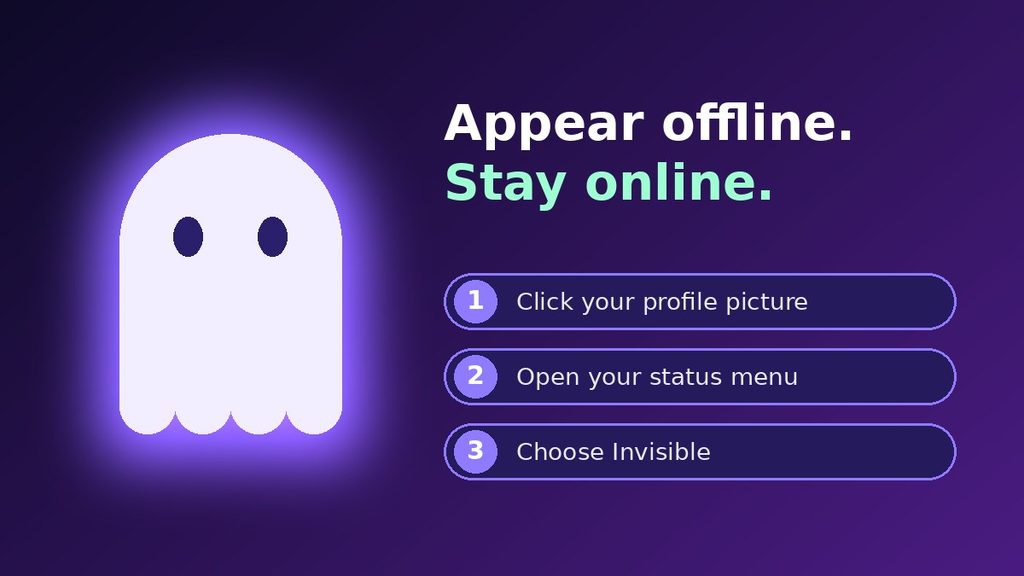
- Click your profile picture in the bottom-left corner.
- Open the status menu.
- Choose Invisible.
On mobile 📱
- Tap your profile picture in the bottom-right corner.
- Tap your current status.
- Choose Invisible.
To come back, repeat the same steps and pick Online. Your friends will see the green dot again right away.
Why Do People Use Invisible on Discord?
The reasons are usually harmless. Most people simply want more control over their time. Here are the most common ones:
- Privacy 🔒 – Not everyone wants the world to know when they are online. Invisible keeps that choice in your hands.
- Peace and focus 🎧 – A green dot invites messages. If you are working or studying, no dot means fewer interruptions.
- Dodging game invites 🎮 – Maybe you want to play alone tonight. Invisible lets you do that without hurting anyone’s feelings.
- Avoiding awkward chats 😅 – We all have a person we aren’t ready to talk to. Invisible gives you space.
- Quietly reading 👂 – Some people love to lurk. They enjoy a busy server without joining the conversation.
- Taking a mental break 🧘 – Constant chat can feel heavy. Going invisible lets you rest without logging off.
So why does it matter? If you wonder what does invisible mean on Discord for your privacy, it comes down to one word: control. You decide who knows you are around.
Real-Life Examples of Using Invisible on Discord
What does invisible mean on Discord in real life? These four everyday situations show it best.
Example 1: The Student Who Needs to Focus 📚
Maya has an exam on Friday. She keeps Discord open because her study group shares notes there. But if she shows as online, her friends send memes and ask her to join a game.
So she switches to Invisible. She still reads the notes and checks the study channel. Nobody pulls her away from her books.
What this shows: Invisible lets you stay connected to what matters while you skip what doesn’t.
Example 2: The Gamer Who Wants a Solo Night 🎮
Jake plays in a squad of five. Every evening, someone pings him for a match. Tonight, he just wants to play a calm single-player game and listen to music.
He goes Invisible, then plays alone. His squad assumes he is away, and nobody feels left out.
What this shows: Invisible is a polite way to take a night off without making a big announcement.
Example 3: The Server Moderator Who Lurks 🛡️
Sara moderates a growing community. She wants to see how members talk when they think no staff are around. So she goes Invisible and reads the chat.
She spots a small argument early and fixes it before it grows. Nobody saw her come in.
What this shows: Invisible helps people watch a space quietly, which is useful for moderators.
Example 4: The Friend Who Replies From “Offline” 💬
You message your best friend. His status says offline. A few seconds later, he answers with a joke.
Is he a ghost? Not quite. He is probably just using Invisible, and he decided your message was worth a quick reply.
What this shows: An offline status does not always mean the person is gone.
Invisible vs Offline, Idle, and Do Not Disturb
These statuses confuse a lot of people. What does invisible mean on Discord compared to the others? The table below shows the differences at a glance.
| Status | What others see | Can you use Discord? | Notifications |
|---|---|---|---|
| Online | Green dot | Yes | Normal |
| Idle | Yellow moon | Yes | Normal |
| Do Not Disturb | Red circle | Yes | Silenced |
| Invisible | Grey circle (looks offline) | Yes | Normal |
| Offline | Grey circle | No, you are not connected | Not live |
Invisible vs Offline
To other people, these look identical. But there is a big difference on your side. When you are truly offline, you are not connected at all. When you are Invisible, you are connected and active.
Invisible vs Do Not Disturb
Do Not Disturb tells everyone, “I’m here, but leave me alone.” Invisible tells them nothing. Also, Do Not Disturb silences your alerts, while Invisible does not. So choose Do Not Disturb if you want quiet. Choose Invisible if you want privacy.
Invisible vs Idle
Idle means you stepped away, and people can see that. It often happens when you stay inactive for a while. Invisible is different because you choose it, and it hides your presence completely.
Does Invisible Mode Affect Your Privacy and Safety?
Invisible mode gives you more privacy, but it is not a full shield. It only controls your status. Your account, your messages, and your server activity all work as usual.
Think of it like closing the curtains in your living room. People outside can’t see you walking around. But if you open the door and talk, they hear you.
What Invisible Hides
- Your online status in member lists and friends lists
- The green dot that shows you are active
- Your general presence, so people can’t tell when you open the app
What Invisible Does Not Hide
- Any message you send in a server or DM
- Your name in a voice channel when you join one
- Your profile, username, and server roles
- Your past messages, which stay visible as always
So, what does invisible mean on Discord for your safety? It means you control your visibility, but you should still think before you post. If you want stronger privacy, also review who can send you friend requests and direct messages in your settings.
Invisible on Discord and Your Daily Routine
Many people use Invisible as a small daily habit. It can protect your time without any drama, and that is why it works so well.
For example, you might go Invisible every morning while you work, then switch to Online after dinner. That way, friends know when you are free to chat. Over time, they learn your rhythm and stop expecting instant replies.
Here are a few simple routines that people like:
- Work hours 💼: Stay Invisible so you can check messages without being pulled into long chats.
- Study time 📖: Use Invisible while you read, then go Online for a short break.
- Game night 🎮: Switch to Online when you actually want to play with friends.
- Late night 🌙: Go Invisible if you can’t sleep but don’t want anyone to notice.
Do you see the pattern? Invisible is not about hiding forever. It is about picking the right moment to be reachable. And once you understand what does invisible mean on Discord, you can use it like a simple on-off switch for social energy.
When Should You Use Invisible on Discord?
What does invisible mean on Discord when it comes to timing? It works best when you want to stay connected without being reachable. Consider using it when:
- You need to focus on work, school, or a project.
- You want to read or listen without joining the chat.
- You feel socially tired but still want to check updates.
- You want to keep your schedule private.
- You are in a server where everyone expects instant replies.
On the other hand, skip Invisible when someone truly needs you. If you run a support server or work with a team, a green dot can help people trust that you are around. And if a friend is waiting for an answer, a quick “I’ll reply later” beats silence.
Here is an honest note: hiding is fine, but ignoring people you care about can hurt. Use Invisible to protect your peace, not to dodge every hard conversation. 💛
Common Misunderstandings About Invisible on Discord
Many people get this wrong. So what does invisible mean on Discord, and what does it not mean? Let’s clear up the biggest myths.
- Myth 1: “Invisible means they blocked me.” ❌ No. Blocking is a separate action. An invisible person can still receive your messages.
- Myth 2: “Invisible hides everything I do.” ❌ Not quite. When you send a message, people can see it. When you join a voice channel, you show up there.
- Myth 3: “Invisible mutes my notifications.” ❌ That is Do Not Disturb. Invisible leaves your alerts as they are.
- Myth 4: “Offline always means the person is gone.” ❌ As you saw, it can also mean Invisible.
- Myth 5: “Invisible is rude.” ❌ Usually it is not. Most people use it for rest or privacy.
How Can You Tell If Someone Is Invisible?
Discord is built so that Invisible and Offline look the same. So you cannot know for sure. Still, a few clues can hint at it:
- They reply fast while their status says offline.
- You see the “typing…” message under their chat while they look offline.
- They appear in a voice channel even though they show as offline elsewhere.
- They react to messages right after you post.
But be careful. These clues are not proof, and guessing can lead to drama. If someone is hiding, they probably have a reason. Respect it. 🤝
Pro Tips for Using Invisible Mode the Smart Way
Now you know what does invisible mean on Discord, so let’s make the most of it. These tips will help you avoid common slip-ups.
- Remember that your actions still show. If you type, send, react, or join a call, people will notice. Plan for that before you speak up.
- Use Do Not Disturb for quiet time. Invisible hides you, but it does not silence your phone. If pings distract you, switch status or mute servers.
- Check your activity privacy settings. Look in your user settings for options about sharing the games you play. This gives you even more control.
- Tell close friends when it matters. A short “I’m going quiet tonight” saves a lot of confusion.
- Don’t spy on people. Lurking in a public channel is fine. Using Invisible to watch someone’s private life is not.
- Switch back when you’re ready. Many people forget they are Invisible and wonder why nobody messages them. 😄
- Read the official help pages. Discord updates its menus often, so the Discord Help Center is a good place to confirm the latest steps.
Final Thoughts on What Invisible Means on Discord
So, what does invisible mean on Discord? It means you look offline to others while you stay online and in control. You can read, chat, and join calls without anyone seeing your green dot.
It is a simple tool, but it gives you real freedom. Use it to focus, to rest, or to enjoy your favorite servers in peace. Just remember that kindness matters. A little honesty with your friends goes a long way.
Next time someone replies from “offline,” you will know exactly what is going on. 😉
FAQ: Invisible on Discord
What does invisible mean on Discord?
Invisible is a status that makes you appear offline to other users. You stay connected, so you can still read messages, send replies, and use voice chat. It is made for privacy and focus.
Can people see me if I’m invisible on Discord?
Not in the member list or friends list, where you look offline. However, people can still see your messages, and you show up if you join a voice channel. The typing message can also appear when you write in a chat.
Can I send messages while invisible?
Yes. Invisible does not limit your messages at all. You can chat in servers and direct messages exactly as you normally would. The only change is how your status looks to others.
Is Invisible the same as Do Not Disturb on Discord?
No. Do Not Disturb shows a red circle and silences your notifications. Invisible shows a grey circle that looks offline and leaves your notifications alone. Pick Do Not Disturb for quiet and Invisible for privacy.